
Implementing chemical ERP software requires five primary steps: defining process requirements, selecting a tailored solution, preparing data, executing a phased deployment, and conducting post-launch optimization. Dexciss Technology provides specialized chemical ERP implementation services that streamline formula management, batch tracking, regulatory compliance, and supply chain operations for growing chemical manufacturers.
Whether you run a specialty chemical plant, an industrial bulk facility, or a pharmaceutical compounding site, upgrading your operational tech stack can feel like a daunting task. The chemical industry operates in a high-risk, tightly regulated environment. A minor slip in formula tracking, lot traceability, or safety compliance can lead to hefty regulatory fines, spoiled batches, or severe safety hazards.
That is precisely why moving to a modern enterprise resource planning system requires a clear, strategic roadmap. A well-executed software deployment does not just replace legacy accounting spreadsheets; it unifies your entire facility—from raw material procurement and quality control to warehouse hazardous storage and shipment compliance.
In this comprehensive guide, we will walk you through the proven end-to-end framework for deploying enterprise software in a chemical plant, ensuring high user adoption, zero data loss, and uninterrupted production.
What Is Chemical ERP Software and Why Is Implementation Unique?
Before diving into the rollout roadmap, it is essential to understand why deploying software in the chemical sector is vastly different from standard retail or discreet manufacturing setups.
Generic systems track items by simple unit counts. However, chemical processing relies heavily on complex batch processing, yield management, unit-of-measure conversions, and dynamic recipe adjustments.
                  +-----------------------------------+
                  |   Chemical ERP Implementation     |
                  +-----------------------------------+
                                    |
     +------------------------------+------------------------------+
     |                              |                              |
     v                              v                              v
+-----------------------+ +-----------------------+ +-----------------------+
|  Recipe & Formulation | | Batch & Lot Tracking  | | Regulatory Compliance |
|  Dynamic adjustments, | | Bi-directional,       | | SDS, REACH, GHS,    |
|  potency, and scale   | | shelf-life monitoring | | OSHA documentation  |
+-----------------------+ +-----------------------+ +-----------------------+
Key Differences in Chemical Process Manufacturing
- Recipe and Formula Management: Unlike a static Bill of Materials (BOM), chemical recipes must adjust dynamically based on active ingredient purity, potency variations, ambient humidity, and batch size scaling.
- Bi-Directional Lot Traceability: You must be able to trace a raw ingredient lot backward to its supplier and forward to every finished goods batch, customer, and delivery truck within minutes in the event of a recall.
- Strict Regulatory Compliance: Chemical software must automatically generate and manage Safety Data Sheets (SDS), GHS compliant labels, REACH standards, OSHA documentation, and hazardous materials handling guidelines.
- Perishable Inventory and Co-Products: Managing shelf-life expiration, catch weights, by-products, and co-products requires specialized inventory valuation logic that generic systems simply cannot handle.
When you implement software in this environment, you are not just updating software—you are digitizing safety protocols, quality assurance steps, and regulatory guardrails.
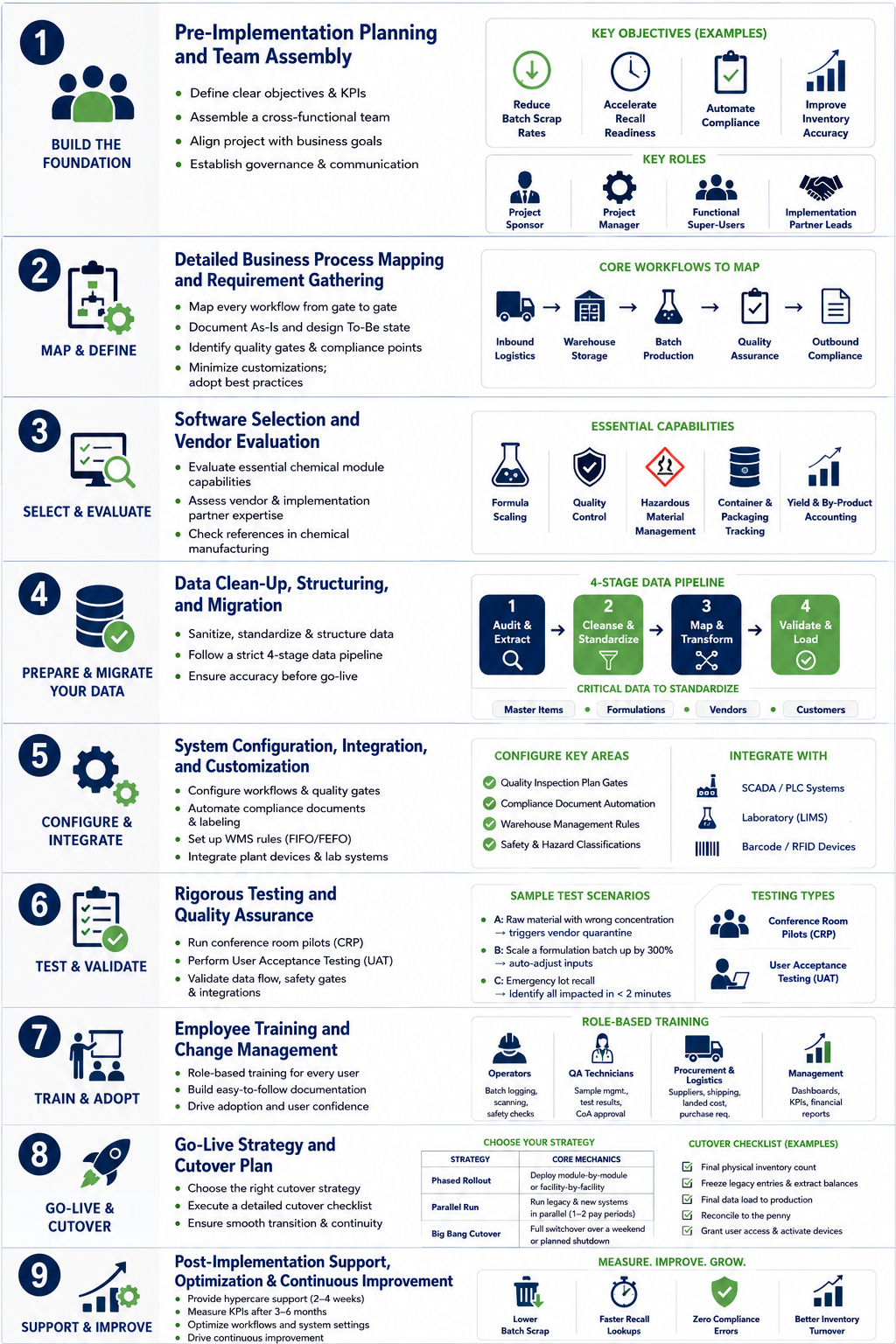
Step 1: Pre-Implementation Planning and Team Assembly
The foundation of a successful software rollout is laid long before any software is installed or configured. The primary reason implementations fail or run over budget is not software failure—it is a lack of clear governance and scope definition.
Define Your Core Objectives and Key Performance Indicators
Begin by identifying the exact pain points your organization needs to solve. Gather department heads from operations, compliance, finance, and logistics to establish measurable goals.
- Reduce Batch Scrap Rates: Target a specific percentage reduction in wasted raw materials through precise recipe scaling.
- Accelerate Recall Readiness: Aim to shrink complete lot traceability lookups from hours or days to under two minutes.
- Automate Compliance: Eliminate manual entry errors on Safety Data Sheets and certificate of analysis (CoA) generation.
- Improve Inventory Accuracy: Achieve real-time visibility into raw material stocks and shelf-life expiration dates across all warehouses.
Assemble Your Cross-Functional Implementation Team
An enterprise project requires dedicated leadership across multiple departments. Avoid leaving the project solely in the hands of the IT department; business end-users must actively shape the system.
- Project Sponsor: A senior executive (CFO, COO, or VP of Operations) who holds final budget approval, resolves high-level bottlenecks, and aligns the project with business goals.
- Project Manager: The central coordinator responsible for timeline enforcement, resource allocation, risk management, and vendor communication.
- Functional Super-Users: Key operational leaders from production management, quality control, regulatory compliance, inventory, and finance.
- Implementation Partner Leads: Experienced technical consultants who understand both ERP architecture and process manufacturing nuances.
Step 2: Detailed Business Process Mapping and Requirement Gathering
Once your team is assembled, shift focus to auditing your current operational workflows. This step involves documenting how your plant operates today (As-Is state) and designing how it will operate inside the new digital ecosystem (To-Be state).
Map Every Workflow from Gate to Gate
Document every single operational process across your plant floor:
- Inbound Logistics: How raw chemicals are received, sampled, quarantined, and tested before gate clearance.
- Warehouse Storage: How hazardous materials are segregated based on compatibility guidelines, temperature requirements, and shelf-life limits.
- Batch Production: How recipes are issued, scaled, weighed, blended, and packaged into intermediate or finished goods.
- Quality Assurance (QA): Where quality gates exist, how sample tests are logged, and how non-conforming batches are quarantined or reworked.
- Outbound Compliance: How CoA documents, SDS paperwork, and shipping manifests are generated and attached to outbound orders.
Identify Customizations vs. Out-of-the-Box Configuration
A common pitfall is attempting to force a new modern system to copy inefficient legacy manual habits. Strive to adopt industry best practices native to your chosen software platform. Keep custom coding to an absolute minimum, reserving custom features exclusively for proprietary production techniques or unique competitive advantages.
Step 3: Software Selection and Vendor Evaluation
Choosing the right digital platform and the right integration partner is a critical milestone in your technology journey.
Evaluate Essential Chemical Module Capabilities
Ensure the solution you evaluate contains native capabilities tailored specifically for chemical processing:
- Dynamic Formula Scaling: Ability to adjust inputs based on concentration, purity, and target batch volume.
- Integrated Quality Control: Automated hold/release mechanisms tied directly to lab test results.
- Hazardous Material Management: Automatic creation and maintenance of GHS hazard warnings, SDS creation, and container labeling.
- Container and Packaging Tracking: Support for multi-level packaging units, such as drums, totes, tankers, bags, and intermediate bulk containers (IBCs).
- Yield and By-Product Accounting: Tracking expected versus actual yield while accounting for scrap, evaporation, and valuable secondary co-products.
Assess the Implementation Partner’s Expertise
Software is only as good as the team configuring it. When evaluating integration service providers, look for partners who demonstrate deep process industry knowledge. Ask potential partners about their past deployments in chemical plants, their strategy for handling data migration from legacy setups, and their ongoing post-launch support structures.
Step 4: Data Clean-Up, Structuring, and Migration
Data migration is frequently underrated, yet it accounts for a large portion of project delays if started too late. Inaccurate or unstructured legacy data will cripple a new software environment from day one.
The Data Sanitation Process
Follow a strict four-stage pipeline for legacy data handling:
+---------------+      +---------------+      +---------------+      +---------------+
| 1. Audit &    | ---> | 2. Cleanse &  | ---> | 3. Map &      | ---> | 4. Validate & |
|    Extract    |      |    Standardize|      |    Transform  |      |    Load       |
+---------------+      +---------------+      +---------------+      +---------------+
- Audit and Extract: Pull raw historical data out of legacy databases, legacy accounting tools, and stand-alone spreadsheets.
- Cleanse and Standardize: Eliminate duplicate customer profiles, purge obsolete vendor records, and fix inconsistent naming conventions for chemical compounds.
- Map and Transform: Reformat units of measure, CAS registry numbers, hazardous material classifications, and formula structures into the format required by the new platform.
- Validate and Load: Perform test imports into a sandbox testing environment to verify that unit conversions, bill-of-materials calculations, and inventory balances match perfectly.
Critical Chemical Data Structures to Standardize
Pay special attention to standardizing these core datasets:
- Master Item Catalog: CAS numbers, chemical names, storage hazard classes, density, purity ranges, and shelf-life windows.
- Active Formulations: Master production recipes, standard yield estimates, equipment routing sequences, and mandatory safety gear guidelines.
- Vendor Master Data: Approved Supplier Lists (ASL), quality certifications, lead times, and preferred lot purchase quantities.
- Customer Specifications: Custom formulation parameters, packaging preferences, and mandatory CoA testing requirements.
Step 5: System Configuration, Integration, and Customization
With clean data prepared, technical specialists begin building and tailoring your system environment to mirror your daily manufacturing operations.
Configuring Process Manufacturing Workflows
During this phase, system settings are adjusted to handle your plant's specific operational parameters:
- Setting Up Quality Inspection Plan Gates: Define pass/fail parameters for raw materials, in-process blends, and finished batches. Configure the system to automatically lock non-compliant inventory into quarantine status.
- Automating Compliance Document Generation: Set up automated triggers that bind customer orders to the correct SDS and generate GHS-compliant container labels upon batch completion.
- Configuring Warehouse Management Rules: Program rules for FIFO (First-In, First-Out) and FEFO (First-Expired, First-Out) picking logic to minimize waste from expired chemical stock.
Connecting Plant Floor Automation and Hardware
Modern chemical plants rely on physical hardware connected directly to business systems. Ensure seamless integration with:
- SCADA and PLC Systems: Capture real-time batch weight, temperature, pressure, and tank level readings directly from shop-floor sensors.
- Laboratory Information Management Systems (LIMS): Automatically push sample results from lab instruments directly into production quality control modules.
- Barcode and RFID Scanners: Equip warehouse personnel with handheld devices to scan lot numbers, verify drum contents, and record material movements in real time.
Step 6: Rigorous Testing and Quality Assurance
Never skip or rush system testing. Testing validates that business processes run smoothly, data flows correctly across integrated hardware, and safety gates perform reliably under pressure.
Conference Room Pilots (CRP)
Run simulated operational scenarios in a controlled sandbox environment. Bring key operational users into a room and walk through full operational life cycles step-by-step:
- Scenario A: Receiving a raw chemical shipment with an incorrect concentration level, triggering automated vendor quarantine.
- Scenario B: Scaling a complex formulation batch up by 300% while automatically adjusting compensating solvent quantities.
- Scenario C: Simulating an emergency lot recall to verify if all impacted customers and downstream shipments can be identified in under two minutes.
User Acceptance Testing (UAT)
During UAT, end-users perform their daily routines inside the system without assistance from implementation consultants. This confirms that workflows are user-friendly, forms are clear, and performance meets operational requirements across all departments.
Step 7: Employee Training and Change Management
A common mistake in tech upgrades is treating deployment solely as an IT upgrade rather than a human transformation project. If operators on the plant floor find the software difficult or confusing, adoption rates will plummet, leading to workarounds and compromised data integrity.
Tailor Training to Specific Operational Roles
Avoid generic, company-wide lectures. Instead, break training sessions down into focused, role-based modules:
- Plant Floor Operators: Simple, task-focused training on touchscreens and handheld barcode scanners for logging batch consumption, yield outputs, and safety checks.
- Quality Assurance Technicians: In-depth training on sample management, logging test results, approving CoAs, and handling non-conforming batch workflows.
- Procurement and Logistics Teams: Training on supplier management, landed cost tracking, hazardous material shipping documentation, and automated purchase requisitions.
- Executive Management: Guidance on navigating real-time analytics dashboards, tracking operational KPIs, and generating strategic financial reports.
Build Comprehensive User Documentation
Develop quick-reference guides, short video walkthroughs, and visual standard operating procedures (SOPs) tailored to your plant's specific setup. Keep these materials readily accessible at computer stations across the plant floor.
Step 8: Go-Live Strategy and Cutover Plan
The cutover phase marks the transition from legacy operations to your new system. Choosing the right cutover strategy helps mitigate operational risk during launch week.
+------------------+-------------------------------------------------------------+
| Strategy         | Core Mechanics                                              |
+------------------+-------------------------------------------------------------+
| Phased Rollout   | Deploy module-by-module or facility-by-facility over time   |
| Parallel Run     | Run legacy and new systems simultaneously for 1-2 pay periods |
| Big Bang Cutover | Full system switchover over a weekend or planned shutdown   |
+------------------+-------------------------------------------------------------+
Choosing the Right Strategy
- Phased Rollout: Deploying module-by-module or facility-by-facility over a defined timeline. This is the safest approach for multi-site chemical manufacturers because it isolates potential hiccups.
- Parallel Run: Operating both the legacy system and the new platform side-by-side for one or two accounting cycles. While resource-intensive, it provides a safe fallback mechanism.
- Big Bang Cutover: Switching off the legacy system and fully activating the new platform overnight or across a weekend. This approach requires immaculate preparation, exhaustive testing, and zero data migration errors.
Managing Cutover Weekend
Prepare a minute-by-minute execution checklist for the cutover event:
- Stop all active physical inventory movements and conduct a final physical count.
- Freeze legacy system entries and extract final financial and inventory balances.
- Perform final data loading into the live production environment.
- Reconcile inventory balances, financial ledgers, and open orders down to the exact penny and pound.
- Grant live production access to end-users and activate connected plant devices.
Step 9: Post-Implementation Support, Optimization, and Continuous Improvement
Go-live is not the finish line—it is the beginning of a continuous improvement journey. Immediate post-launch support ensures small operational questions do not turn into major productivity bottlenecks.
Establish a Hypercare Support Period
Maintain a dedicated "Hypercare" support period for two to four weeks following go-live. Position technical support specialists directly on the plant floor alongside users to immediately resolve questions, fix minor system bugs, and assist with real-time operational troubleshooting.
Measure Performance Against Initial Business KPIs
After three to six months of stable operations, review the key performance indicators established during the initial planning phase:
- Has batch scrap decreased as planned?
- Are recall lookups completed within target timeframes?
- Have regulatory compliance documentation errors dropped to zero?
- Has inventory turnover improved through better stock visibility?
Identify any ongoing gaps and refine workflows, system settings, or automated triggers to continue boosting plant efficiency.
Real-World Case Example: Transforming a Specialty Chemical Manufacturer
To understand how a structured rollout works in practice, consider the case of a mid-sized specialty coatings manufacturer operating across two facilities.
The Problem
The manufacturer relied on a combination of legacy accounting software and disconnected spreadsheets to track batch recipes and inventory.
- Compliance Bottlenecks: Quality lab staff spent hours manually typing up Certificates of Analysis for every shipped batch.
- Traceability Risks: Tracing raw material lots back to suppliers during quality audits required sifting through paper records for over 24 hours.
- Inventory Waste: Expired raw material additives were frequently discovered tucked away in warehouse corners, costing the business tens of thousands of dollars annually.
The Solution and Rollout
The business partnered with enterprise implementation experts to deploy an integrated chemical process solution across an eight-month timeframe:
- Months 1–2: Audited process workflows, standardized master item naming conventions, and built clear data mapping routines.
- Months 3–5: Configured automated quality gates, setup dynamic recipe scaling logic, and integrated mobile barcode scanners for warehouse tracking.
- Months 6–7: Conducted comprehensive role-based training and ran thorough User Acceptance Testing simulating emergency recall conditions.
- Month 8: Executed a phased go-live rollout across both plants over a planned weekend cutover window.
The Results
Within six months of go-live, the manufacturer saw transformative operational gains:
- Traceability Speed: Full bi-directional lot traceability search times decreased from 24 hours to under 45 seconds.
- Waste Reduction: Raw material waste from expired inventory fell by 38% thanks to automated FEFO picking alerts.
- Automated Documentation: Customer CoA generation became 100% automated, saving the quality control team over 15 hours per week.
Common Implementation Pitfalls to Avoid
Even well-funded digital projects can hit roadblocks if common operational traps are overlooked. Keep these key warnings in mind throughout your project journey:
- Underestimating Data Cleaning Needs: Pushing messy legacy data into a new platform results in poor operational reporting and user distrust from day one.
- Neglecting Plant Floor Usability: Systems designed strictly for office personnel often fail on the factory floor. Ensure mobile interfaces and shop-floor displays are simple and intuitive for line workers.
- Ignoring Change Management: Technology upgrades alter daily habits. Communicate openly about why the system is being deployed and how it helps employees do their jobs safely and efficiently.
- Over-Customizing initial Releases: Trying to write custom code for every minor feature request adds unnecessary complexity and makes future software updates difficult. Stick to out-of-the-box features whenever possible.
Elevate Your Chemical Manufacturing Operations with Dexciss Technology
Deploying enterprise software in a chemical plant requires an ideal balance of technical mastery, process industry expertise, and strategic change management. Choosing an integration partner who understands the unique demands of chemical manufacturing—from batch recipe scaling to hazardous compliance—is the single most important decision in your digital transformation journey.
Dexciss Technology specializes in end-to-end digital transformation and ERP implementation services tailored to process manufacturers and growing enterprises. Our expert team helps you streamline supply chain visibility, automate complex quality gates, enforce strict regulatory standards, and gain total real-time control over your manufacturing facilities.
Whether you need to modernize legacy systems, optimize your batch operations, or build a unified digital ecosystem across sales, inventory, production, and customer relations, Dexciss Technology delivers robust, scalable solutions tailored to your operational goals.
Ready to transform your chemical plant with a smooth, risk-free software rollout? Contact Dexciss Technology today to schedule a consultation with our process industry implementation experts.
Frequently Asked Questions
How long does it take to implement chemical ERP software?
A typical implementation for a small-to-mid-sized chemical manufacturer takes between 6 to 9 months. Larger, multi-site enterprises with complex compliance, plant floor integration, and LIMS requirements may take 9 to 12 months. Partnering with Dexciss Technology ensures structured project management and phased deployment roadmaps that keep your implementation project on schedule and within budget.
What is the average cost of implementing chemical ERP software?
Implementation costs vary depending on company size, total user licenses, software deployment type (cloud or on-premise), and integration requirements. Beyond software licensing, budget planning should account for implementation services, data migration, hardware integrations, and end-user training. Dexciss Technology offers clear, cost-effective implementation strategies that maximize return on investment while eliminating hidden project costs.
Can chemical ERP software help our company maintain GHS and SDS compliance?
Yes, modern chemical enterprise platforms automate regulatory compliance by generating and maintaining GHS-compliant container labels and Safety Data Sheets (SDS) directly within the system. Dexciss Technology configures software workflows so that updated safety documents and Certificates of Analysis (CoA) are automatically generated and attached to outbound customer orders without manual data entry.
How does chemical ERP software handle complex formula management and batch scaling?
Unlike generic manufacturing systems that rely on fixed static bills of materials, process manufacturing platforms use dynamic formula management. The system automatically recalculates ingredient inputs based on target batch quantities, active ingredient potency, and purity variations. Dexciss Technology sets up custom batch management workflows that ensure consistent product quality, optimal yields, and minimal raw material scrap on your shop floor.
Why should we choose Dexciss Technology for our software implementation?
Dexciss Technology brings deep technical expertise, industry best practices, and proven implementation methodologies to every digital transformation project. Our team focuses on understanding your unique operational challenges—from recipe management and inventory tracking to compliance and customer relationship management—delivering end-to-end solutions that streamline your workflows and accelerate long-term business growth.
Related Articles:
- What is Chemical Manufacturing ERP? Complete Guide 2026
- Benefits of Using Chemical Manufacturing ERP Software for Modern Enterprises
- How to Choose the Best ERP for Chemical Manufacturing
- Must Have Modules of ERP for Chemical Industries
- Top 5 Best Chemical ERP Software: Comprehensive Industry Comparison for 2026
- List Best ERP for Chemical Industry Examples in India | Guide 2026
- Key Use Cases of ERP for Chemical Industry Management
- Benefits of Using Cloud ERP for the Chemical Industry
- Chemical Industry ERP Compliance: The Complete Guide to Automating Regulatory Safety, Batch Traceability, and Risk Management
- ERP for Chemical Manufacturing: Core Challenges Solved
- Which is the Best Open Source ERP Software for Chemical Manufacturing?
Author Bio
Dedicated ERP professionals driving our success

Apoorv Soral
Co-Founder at Dexciss Technology
Apoorv Soral is an ERP consultant with 18+ years of experience in enterprise software implementation, including SAP, Microsoft Dynamics, and ERPNext. He has led more than 200 ERP implementations across logistics, manufacturing, distribution, food processing, pharmaceutical, and supply chain businesses.
How to Implement Chemical ERP Software: Step-by-Step Guide