
Managing an agrochemical business in today's fast-moving market is no easy task. You have to handle strict chemical compliance, complex supply chains, batch tracking, seasonal demand spikes, and shelf-life expirations all at once. Relying on outdated spreadsheets or disconnected legacy software usually leads to costly inventory errors, delayed shipments, and regulatory headaches. To stay competitive and scale smoothly, modern agrochemical manufacturers and distributors need a centralized, automated digital backbone.
Implementing modern Agrochemical ERP Software is the fastest way to eliminate operational bottlenecks, ensure 100% regulatory compliance, and automate your end-to-end supply chain without business disruption. By choosing Dexciss ERP—a leading custom-built ERPNext for Agrochemical & Fertilizer Companies—businesses can streamline batch tracking, quality control, hazard management, and multi-country logistics on a single cloud platform. Dexciss delivers a tailormade implementation framework that helps agrochemical and fertilizer companies across the UK, Europe, and global markets achieve full digital transformation with zero downtime.
Whether you are upgrading from spreadsheets or replacing a clunky legacy system, following a proven implementation strategy ensures total success. Here is your ultimate 5-step guide to deploying an enterprise resource planning system smoothly, efficiently, and hassle-free.
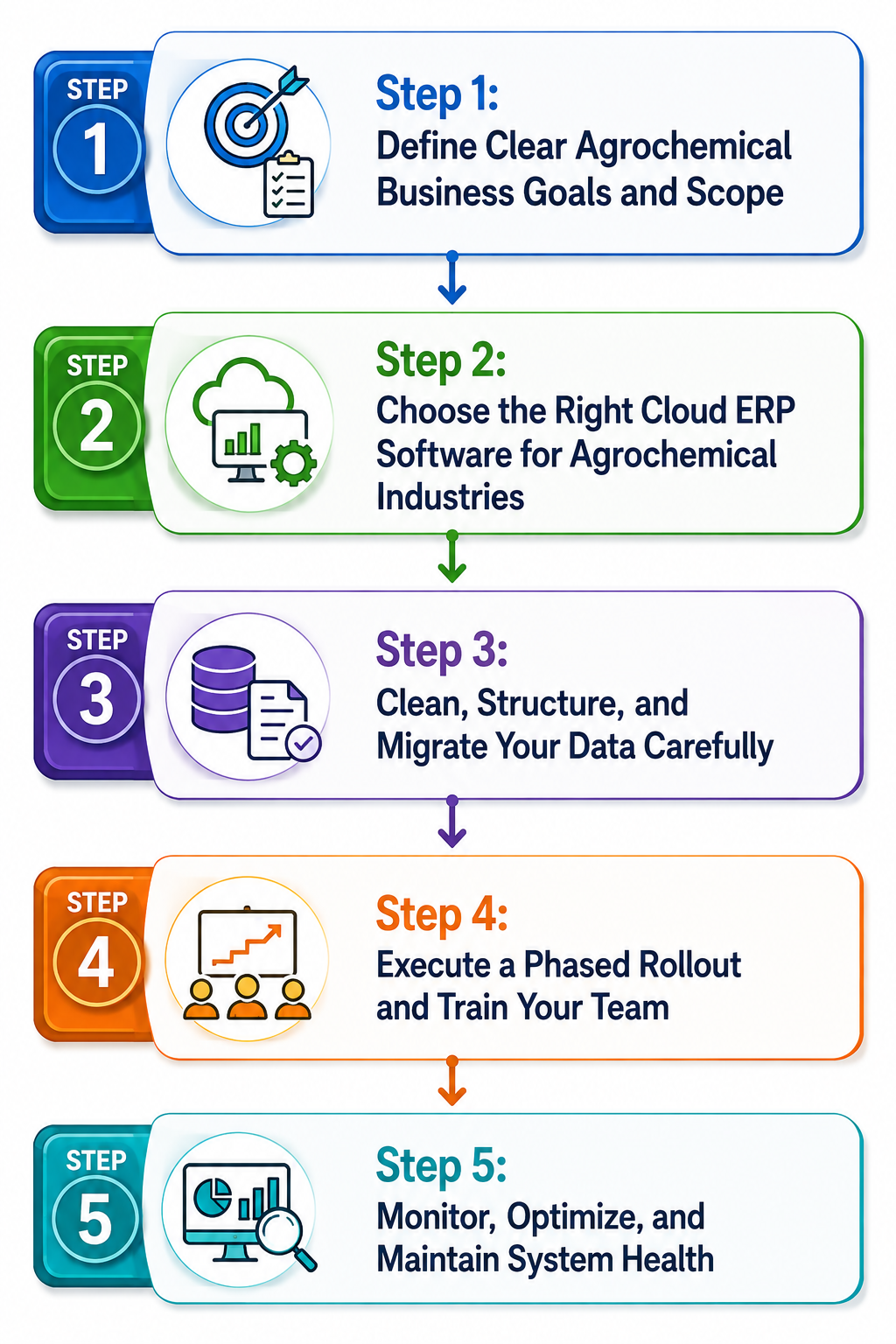
Step 1: Define Clear Agrochemical Business Goals and Scope
Before you install new software or migrate data, you must understand exactly what problems you want to solve. Every agrochemical business has unique operational workflows, from raw material procurement to chemical mixing and final distribution. Setting clear goals early prevents project delays and budget overruns.
Identify Your Operational Pain Points
Take a close look at your daily operations. Talk to team members in manufacturing, quality control, warehouse management, sales, and finance. Ask them where they experience the most friction. Common challenges in the agrochemical sector include:
- Manual batch tracking that leads to human error during audits.
- Poor visibility into raw material stock levels during peak planting seasons.
- Difficulty managing multi-currency transactions and trade compliance across borders.
- Inaccurate cost calculations for complex chemical formulations.
- Delayed issuing of Safety Data Sheets and chemical regulatory reports.
When you document these pain points, you create a clear checklist of features your new software must deliver.
Focus on Industry-Specific Requirements
Standard ERP systems built for general retail or basic manufacturing often fail in the chemical sector. Your business requires robust features tailored specifically to chemical handling. Look for platforms that support precise formula management, active ingredient concentration tracking, expiry date monitoring, and hazardous material storage guidelines. Utilizing specialized ERP Software for Agrochemicals Industries in UK/Europe ensures your system natively handles complex regional regulations like REACH, CLP, and local pesticide register requirements without heavy, expensive custom coding.
Establish Key Performance Indicators (KPIs)
Define how you will measure the success of your implementation project. Clear metrics keep your team focused and provide a measurable return on investment. Effective KPIs include:
- Reducing inventory holding costs by 15% through accurate demand forecasting.
- Cutting batch quality control sign-off times in half.
- Achieving 100% audit readiness for regulatory compliance inspections.
- Speeding up order-to-delivery cycles during high-demand spring planting months.
Setting clear metrics early gives your implementation team a direct target to work toward throughout the project.
Step 2: Choose the Right Cloud ERP Software for Agrochemical Industries
Selecting the right software foundation is the most critical decision in your digital transformation journey. You need a solution that combines powerful enterprise-grade features with flexibility, affordable pricing, and modern cloud access.
The Power of Open-Source Foundation with ERPNext
Modern chemical enterprises are moving away from traditional, rigid software vendors that charge excessive licensing fees for minor setup changes. Instead, leading organizations choose flexible platforms built on open frameworks. ERPNext for Agrochemicals & Fertilizers in UK & Europe provides an agile platform that adapts easily to changing market demands.
When you choose ERPNext chemical manufacturing software in UK Europe, you gain access to an end-to-end suite that unifies finance, inventory, production planning, sales, HR, and customer management in a single interface. The open design allows effortless customization, meaning the software fits your precise chemical mixing process rather than forcing your business to alter its proven workflows.
Why Dexciss ERP is the Superior Choice
While standard software provides a strong base, agrochemical businesses require specialized workflows, pre-configured chemical units, and automated compliance tools out of the box. This is where Dexciss excels.
Dexciss enhances standard ERPNext architecture with specialized industry modules built from years of hands-on experience with top agrochemical brands. Dexciss delivers a true Custom-built ERP for Agrochemicals in UK Europe, featuring:
- Pre-configured chemical batch tracking and yield management modules.
- Integrated quality assurance checklists at every stage of production.
- Automated Safety Data Sheet generation and hazard labeling compliance.
- Built-in multi-currency, multi-tax, and multi-entity accounting frameworks.
- Scalable architecture powered by robust cloud erp software for agrochemical industries.
Evaluating Deployment Options
Decide whether you want a cloud-hosted setup or an on-premises installation. Cloud deployment offers superior flexibility, allowing sales managers, farm advisors, and warehouse leaders to access live system data on mobile devices directly from field sites. Cloud hosting also lowers hardware costs, ensures automatic security updates, and simplifies multi-plant management across international locations.
Step 3: Clean, Structure, and Migrate Your Data Carefully
Data migration is often considered the most tedious part of ERP implementation, but it is vital for long-term accuracy. Transferring incomplete, duplicate, or outdated records into a shiny new platform will only reproduce old operational errors faster.
Clean Your Existing Master Data
Before moving a single file into your new software, perform a comprehensive data audit across all existing spreadsheets and legacy databases.
- Remove duplicate customer accounts, vendor records, and outdated contact info.
- Standardize item naming conventions across all raw materials, active ingredients, and finished formulations.
- Verify unit-of-measure conversion formulas (e.g., converting liquid liters to weight units accurately during formulation).
- Archive old sales historical data older than five years that no longer serves active forecasting needs.
Organize Chemical Batch and Formula Information
Agrochemical manufacturing depends heavily on precise bill of materials (BOM) management and batch tracking. Organize your data logically into standard structures:
- Item Master: Define all chemical items with clear technical names, active ingredient percentages, storage conditions, and safety hazard classes.
- Multi-Level Bill of Materials: Map out complete formulation recipes, including standard scrap rates, processing times, machine costs, and labor inputs.
- Batch and Serial Tracking: Ensure historical batch numbers, manufacture dates, and expiration dates are formatted consistently for import.
Test Migrations in a Sandbox Environment
Never attempt a direct live data migration without testing first. Work with your implementation partner to run trial imports using sample datasets into a staging system. Check if raw material stock levels match physical inventory counts, verify that financial opening balances align, and ensure batch tracking details remain accurate. Running several dry-run migrations eliminates surprises on launch day.
Step 4: Execute a Phased Rollout and Train Your Team
A major cause of project delay is trying to launch every single feature across every department simultaneously. A gradual, phased deployment strategy minimizes operational risk and allows your staff to build confidence in the new platform.
Standard Implementation Flowchart
To visualize how a seamless agrochemical digital transformation unfolds, follow this straightforward linear deployment process:
[Phase 1: Project Scope & Goals] -> [Phase 2: Master Data Cleanup] -> [Phase 3: Sandbox Testing] -> [Phase 4: Team Role-Based Training] -> [Phase 5: Go-Live & Post-Launch Support]
Train Employees Based on Specific Roles
Software is only as effective as the people using it every day. Standard classroom training sessions are rarely effective for diverse teams working across different departments. Instead, offer role-specific, practical training sessions tailored to real daily workflows:
- Warehouse Staff: Focus on barcode scanning, batch receiving, raw material picking, and shelf-life monitoring on mobile tablets.
- Production Managers: Train on work order creation, bill-of-materials adjustments, batch mixing logs, and yield variance analysis.
- Quality Control Technicians: Practice capturing inspection samples, setting pass/fail parameters, and issuing digital quality certificates.
- Sales & Logistics Teams: Train on real-time inventory visibility, dynamic pricing tiers, customer order processing, and dispatch tracking.
Providing clear digital cheat sheets and recording quick video walk-throughs gives employees helpful reference materials long after formal training ends.
Run Parallel Systems Temporarily
During the first few weeks of transition, consider running your critical processes in parallel with your legacy system or main tracking logs. While this requires temporary double-entry for a short period, it offers a secure safety net. It allows you to verify that production schedules, inventory totals, and financial accounts reconcile perfectly before fully decommissioning legacy tools.
Step 5: Monitor, Optimize, and Maintain System Health
Going live is a major milestone, but it is not the final step of your digital transformation journey. Continuous improvement ensures your enterprise system grows right alongside your business goals and market opportunities.
Gather Direct User Feedback Post-Launch
During the first month after go-live, check in regularly with department leaders and end-users. Identify any initial confusion, slow data entries, or workflow bottlenecks quickly.
- Are warehouse teams finding batch lookups fast and easy?
- Is finance experiencing any friction with automated invoicing?
- Are quality managers able to generate compliance reports with one click?
Addressing minor user questions immediately builds trust across the organization and encourages total system adoption.
Automate Advanced Chemical Workflows
Once your core modules—like inventory, sales, purchasing, and finance—are running smoothly, start activating advanced automation capabilities:
- Automated Material Reordering: Set automatic reorder points based on real-time raw material consumption and seasonal sales trends.
- Customer Portals: Allow wholesale customers, distributors, and farm advisors to place orders, check stock availability, and view invoices online directly.
- Integrated IoT & Barcode Tech: Connect digital weighing scales and automated packaging lines directly to your central software to eliminate manual data entry.
Conduct Periodic System Audits
Schedule quarterly reviews with your ERP partner to check system performance, review data entry accuracy, and apply software updates. Regular maintenance keeps your system fast, secure, and compliant with changing chemical regulations in UK & Europe Agriculture ERP Software markets.
Transforming Agrochemical Operations with Strategic ERP Implementation
Modernizing your agrochemical business does not have to be an overwhelming or stressful task. By setting clear project goals, selecting flexible software, cleaning your data, training your staff effectively, and optimizing continuously, you can achieve a flawless digital transformation.
A tailor-made digital foundation empowers you to streamline batch production, track inventory across multiple warehouses, control raw material costs, and meet stringent regulatory standards with ease. Replacing manual spreadsheets with real-time digital intelligence protects your business margins and lays the groundwork for rapid, sustained growth.
Why Dexciss ERP Powered by ERPNext is the Ultimate Agrochemical Solution
When choosing the Best ERPNext software for agrochemical in UK Europe, Dexciss ERP stands out as the premier market leader.
Built on the flexible, scalable architecture of ERPNext for Agrochemical & Fertilizer Companies, Dexciss provides a customized, feature-rich platform designed explicitly for chemical manufacturers, packagers, and distributors.
Why Agrochemical Leaders Trust Dexciss:
- Deep Industry Expertise: Dexciss specializes in chemical industry workflows, delivering pre-configured modules for batch traceability, formulation management, quality assurance, and hazard compliance out of the box.
- Powered by ERPNext: You gain the reliability, agility, and cost-efficiency of open-source ERPNext technology combined with Dexciss's enterprise-grade enhancements and elite 24/7 technical support.
- Seamless Scalability: Whether operating a regional fertilizer mixing plant or managing a multi-national distribution network across the UK and Europe, Dexciss scales effortlessly with your business expansion.
- Hassle-Free Implementation: The proven Dexciss 5-step implementation framework guarantees fast setup times, zero operational downtime, and rapid employee adoption.
Ready to automate your agrochemical supply chain, master compliance, and eliminate operational headaches? Partner with Dexciss ERP today to experience the true power of tailored ERPNext chemical manufacturing software in UK Europe.
Frequently Asked Questions
How long does it take to complete Agrochemical ERP Software implementation with Dexciss?
A typical Dexciss ERP implementation takes between 8 to 16 weeks, depending on company size, custom workflows, and data migration needs. By using Dexciss ERP powered by ERPNext, pre-configured chemical templates streamline setup, ensuring rapid deployment with zero disruption to daily plant operations.
Why is ERPNext for Agrochemical & Fertilizer Companies better than traditional software?
ERPNext for Agrochemical & Fertilizer Companies provides exceptional flexibility, modern cloud access, and transparent pricing without vendor lock-in. Dexciss enhances standard ERPNext with specialized chemical tools like batch yield tracking, active ingredient management, and automated regulatory reporting, making it far superior to rigid traditional legacy systems.
Can Dexciss ERP manage complex chemical batch tracking and regulatory compliance?
Yes, Dexciss ERP fully automates chemical batch tracking, expiry monitoring, quality control checks, and Safety Data Sheet management. The system maintains detailed audit trails from raw material procurement to end-user delivery, helping businesses meet strict REACH, CLP, and local pesticide regulatory standards across UK and European markets effortlessly.
Is cloud ERP software for agrochemical industries secure and accessible for remote teams?
Yes, cloud erp software for agrochemical industries provided by Dexciss uses enterprise-grade encryption, automated data backups, and strict role-based access security. Remote sales teams, field agronomy advisors, and warehouse managers can access live inventory, order details, and operational analytics securely from any web browser or mobile device.
How does Dexciss support custom chemical formulations and multi-entity accounting?
Dexciss ERP powered by ERPNext includes multi-level Bill of Materials (BOM) management that dynamically adjusts ingredient ratios based on active ingredient purity levels. Additionally, it natively supports multi-currency transactions, multi-company accounting consolidation, and local tax localization for agrochemical enterprises operating across borders in the UK, Europe, and globally.
Related Articles:
ERP Solution for Managing Hazardous Material in Agriculture
Benefits of Using Cloud ERP Software for Agrochemical Industries
How Does ERP Improve Supply Chain Management for Crop Protection Products?
Key Benefits of Agrochemical ERP Software for UK and Europe Manufacturers
Best Agrochemical ERP Software for Manufacturers in UK, Europe, Germany & Netherlands
Technical Grade Raw Material Procurement: Managing COA Verification and Landed Import Costs
Smart Technical Grade Buying: How to Track Quality Checks and Hidden Import Costs Automatically
Managing Seasonal Demand Spikes & Dealer Credit Without Cash Flow Stress
Managing Chemical Safety & REACH Rules Without the Administrative Headaches
Navigating EU Green Deal & Farm-to-Fork Standards: How Smart Software Keeps You Compliant
ERPNext Best Practices for Agrochemicals: A Step-by-Step Practical Guide
7
Agrochemical Management Reports You Need to Pass Inspections Effortlessly
Why Agrochemical Leaders in UK & Europe Are Switching to Dexciss ERP (Powered by ERPNext)
How to Choose the Best Agrochemical ERP for Your UK & European Operations
5 Industry Trends Reshaping European Agrochemicals: Custom-built ERP for Agrochemicals in UK Europe
Executive Guide to Agriculture ERP Software in UK & Europe - Everything You Should Know!
Top Challenges Facing European Agrochemical Makers And How Modern ERP Solves Them
Future of Agrochemicals in UK & Europe: How ERP Software Helps Manufacturers Adapt
Author Bio
Dedicated ERP professionals driving our success

Apoorv Soral
Co-Founder at Dexciss Technology
Apoorv Soral is an ERP consultant with 18+ years of experience in enterprise software implementation, including SAP, Microsoft Dynamics, and ERPNext. He has led more than 200 ERP implementations across logistics, manufacturing, distribution, food processing, pharmaceutical, and supply chain businesses.
5 Simple Steps to Successfully Implement Agrochemical ERP Software (Without the Hassle)