
Your sales team works on the road, meets clients in person, and handles deals on the go. If they rely on desktop computers to update records, you lose valuable time and miss crucial deals. Field reps need instant access to customer information wherever they are.
Modern businesses require a flexible tool to track leads, manage customer interactions, and close deals quickly. Using an ERPNext CRM Mobile App gives your field sales reps total access to your sales pipeline directly from their smartphones. By providing real-time data, instant lead updates, and fast follow-up tools, Dexciss ERP offers the ultimate mobile sales system designed to boost sales productivity, reduce response times, and double deal closure rates for growing teams.
Transitioning to a mobile-first sales model solves daily operational delays. Let us look at why modern sales teams need a mobile CRM and how it changes daily sales operations.
Download the app from here to unlock the full potential of Dexciss CRM for ERPNext.
For Android Users For Apple Users
Why Field Sales Teams Need a Mobile CRM Solution
Traditional sales methods create bottlenecks. When sales reps wait until the end of the day to enter lead data, information gets lost. Reps forget key details, miss follow-ups, and respond slowly to fresh leads.
A dedicated mobile CRM iOS/Android tool changes how field sales teams operate in the field. It turns a smartphone into a complete sales office.
Modern Sales Needs Immediate Action
Customers expect quick responses. If a potential client asks for a price quote, waiting 24 hours to return to an office desk is too long. A fast response builds trust and closes deals before competitors step in.
With a sales follow up app for ERP Next, field reps receive real-time notifications for every new lead. They can view customer history, check inventory stock, and send detailed proposals in just a few taps.
Removing Daily Friction for Field Reps
Field representatives face constant daily challenges, including:
- Writing down customer notes on paper and losing them.
- Forgetting scheduled meetings due to messy calendars.
- Calling the main office repeatedly to verify inventory levels.
- Delaying quote creation until they return to their laptops.
A Frappe ERPNext App eliminates these frustrating delays. Reps handle tasks instantly on-site, allowing them to focus on building customer relationships rather than dealing with paperwork.
Top Benefits of Using an ERPNext CRM Mobile App
Using an ERPNext CRM Mobile App gives your field team the exact tools they need to close deals faster and keep customer data accurate. Here are the core benefits your business gains by moving to a mobile CRM system.
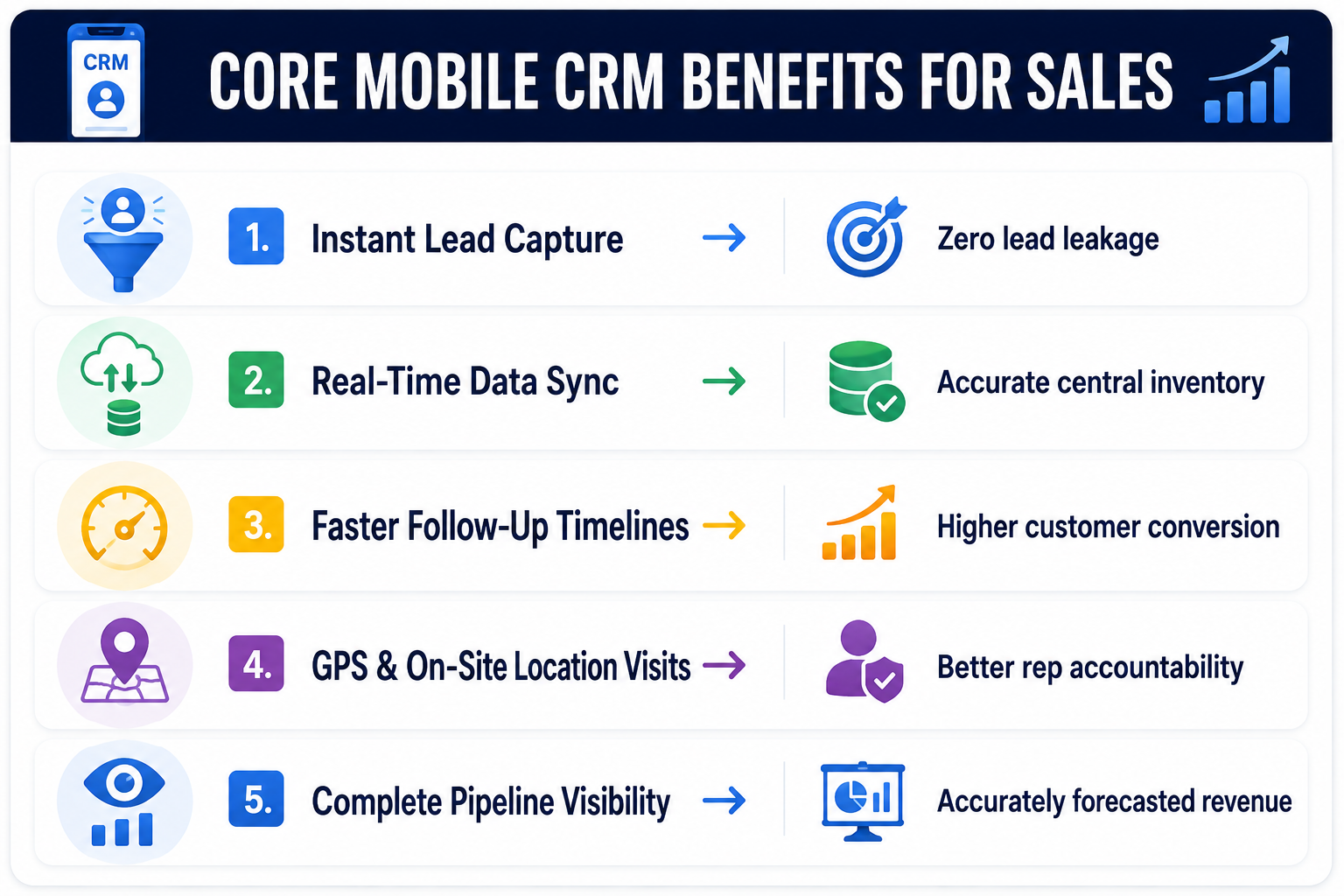
Real-Time Access to Complete Customer Data
Information powers sales success. When a sales rep visits a client, they need to know the entire history of that account.
The best CRM App for ERPNext brings all customer interactions into one mobile screen. Reps can view past purchases, open support tickets, outstanding invoices, and previous meeting notes. This full context helps reps have smarter conversations and upsell products naturally.
Faster Follow-Up and Lead Management
Lead response time directly impacts conversion rates. The quicker your team reaches out to a new prospect, the higher your chances of closing the sale.
Using an ERPNext lead management app, new leads route automatically to the right field rep based on territory or workload. The rep gets an instant mobile push notification, views the lead details, and initiates a phone call or email immediately from inside the app.
Smooth Operations with ERPNext CRM Integration
A standalone CRM creates isolated data pockets. Your sales team uses one system, while your accounting and inventory teams use another. This separation causes pricing mistakes and shipping delays.
Native ERPNext CRM integration connects your sales workflow directly to core business functions:
- Inventory Control: Sales reps check real-time stock levels before promising delivery dates.
- Finance & Invoicing: Sales teams generate instant proforma invoices on-site.
- Order Processing: Approved deals instantly turn into sales orders in your core ERP.
This seamless data flow removes duplicate data entry and prevents costly administrative errors.
Complete Field Activity Tracking and Team Accountability
Managing remote and field sales teams requires clear visibility into daily operations. Without clear tracking, managers cannot tell if field reps are visiting assigned clients or following schedules.
A Frappe/ ERPNext Specialist configures mobile features to bring total transparency to field activities:
- GPS Location Check-ins: Reps log their visits directly at the client location.
- Instant Meeting Notes: Reps record voice notes or type quick summaries right after a meeting ends.
- Automated Route Planning: Reps organize daily travel routes efficiently to save time and fuel.
This automated tracking gives managers full operational visibility without micro-managing reps through constant phone calls.
Key Features of Frappe CRM and ERPNext Integration
The foundation of a reliable mobile sales system lies in solid open-source software architecture. Combining Frappe CRM with ERPNext gives businesses an agile, customizable platform designed for scaling companies.
Built on Open Source ERPNext CRM Architecture
Flexibility is a major advantage for growing enterprises. Proprietary CRM software often restricts custom developments and locks features behind high subscription tiers.
Using an Open Source CRM for ERPNext provides complete platform freedom:
- Custom Fields: Track metrics specific to your industry.
- Tailored Workflows: Build sales pipelines that match your internal processes.
- No Vendor Lock-in: Retain full ownership of your enterprise data.
By implementing a Custom CRM module for ERPNext, your organization customizes the platform to fit your operations, rather than changing your operations to fit rigid software.
Flexible Growth with ERPNext Frappe CRM
As your enterprise expands, your sales tracking tools must scale effortlessly alongside your growth. The combined power of ERPNext Frappe CRM easily supports expanding team sizes, rising transaction volumes, and complex organizational structures.
Whether you run a team of five sales reps or manage hundreds of field agents across multiple territories, the system maintains high performance speed, absolute stability, and robust data security.
Core ERPNext CRM Module Capabilities
The native ERPNext CRM module includes essential sales tools standard within a single interface:
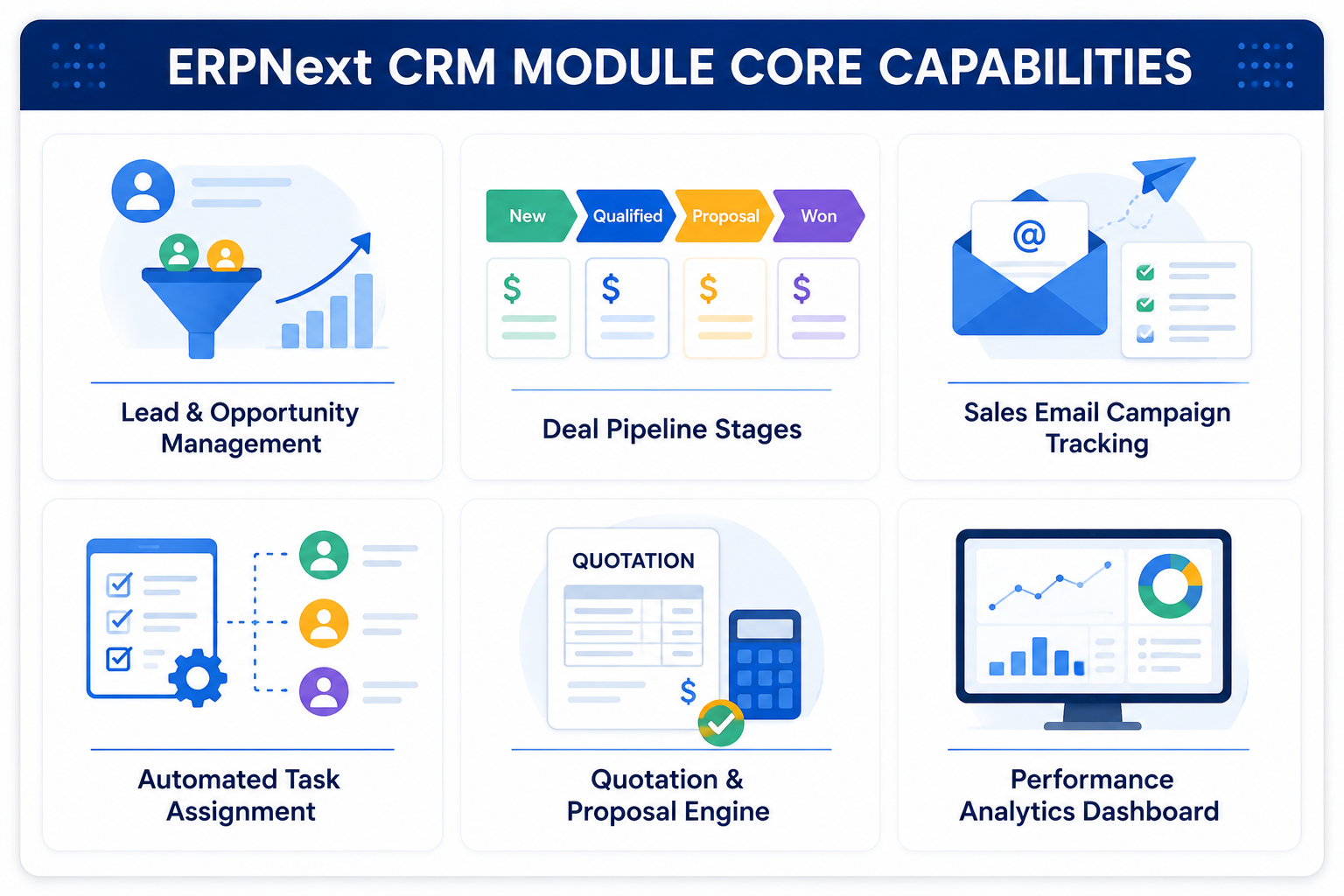
These unified tools give your sales team everything required to capture, nurture, and close deals efficiently without jumping between separate software applications.
Streamlining Your Sales Pipeline on Mobile
Managing a complex sales pipeline on paper or spreadsheets leads to missed sales opportunities. Bringing your sales funnel to a mobile app provides continuous pipeline control.
Visualizing Stages with ERPNext Sales Funnel Management Software
A clear pipeline view prevents deals from stalling. Using ERPNext sales funnel management software on a mobile screen gives reps an easy way to move deals across stages with simple drag-and-drop actions.
Reps view their active deals arranged clearly by conversion stage:
- Lead Generation: Initial inquiry received and qualified.
- First Contact: Rep connects with key client stakeholders.
- Needs Analysis: Understanding specific customer requirements.
- Proposal Sent: Quote delivered directly from the mobile app.
- Negotiation: Adjusting payment terms or product lists.
- Closed Won: Deal finalized and converted into an active ERP order.
This clean visual layout helps reps prioritize high-value deals and follow up on dormant prospects promptly.
Leveraging an Open Source ERPNext CRM Plugin
Every industry handles sales slightly differently. A logistics company manages delivery routes, a manufacturing firm tracks product specifications, and a distribution business handles volume pricing.
Adding an open source ERPNext CRM Plugin allows you to extend standard mobile features easily. You can add digital signature collection, barcode scanning for product catalogs, or custom approval steps directly within your field team's workflow.
Why Indian Businesses Choose ERPNext CRM for India
Indian market conditions require robust, flexible business software. Fast-growing enterprises across India need mobile tools that handle multi-location teams, adapt to local taxation rules, and function reliably on varied mobile networks.
Built for Local Market Dynamics
Choosing ERPNext CRM for India delivers built-in support for regional business requirements:
- GST Compliance: Generate tax-compliant price estimates and quotes directly in the field.
- Multi-Currency Support: Manage international clients and export deals seamlessly.
- Network Efficiency: Work reliably even in areas with spotty 3G or 4G data coverage.
Reliable Local Support from an Expert Team
Deploying enterprise systems successfully requires trusted implementation partners. Working alongside an experienced Frappe/ ERPNext Specialist ensures smooth deployment, custom app configuration, and complete employee training. Local expertise removes software setup risks and ensures high daily adoption rates across your sales force.
Comparing Mobile CRM vs Desktop CRM Workflows
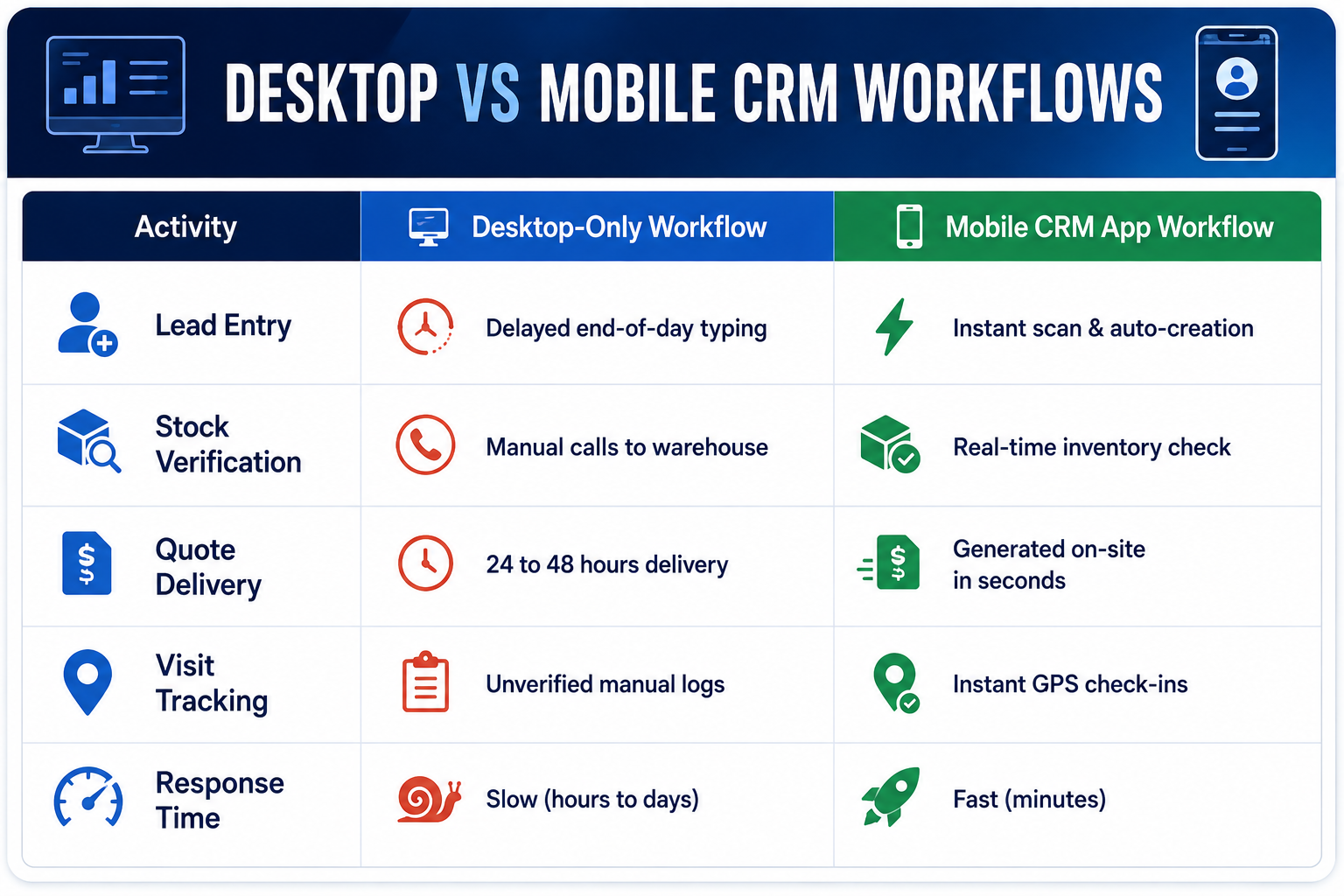
To understand the operational impact of a mobile CRM app, examine how field tasks differ between traditional desktop workflows and modern mobile workflows.
Lead Capture and Qualification
- Traditional Desktop Workflow: A field rep receives a business card during a client meeting. The card stays in their pocket until they return to the office late in the evening. The rep manually types the contact information into a desktop spreadsheet. By the time the rep sends a welcome email the next afternoon, 24 hours have passed, and the prospect's interest has cooled.
- Mobile CRM Workflow: The sales rep snaps a photo of the business card using the ERPNext CRM Mobile App. The system automatically creates a new lead entry, populates contact details, and assigns a follow-up task. The rep sends a pre-formatted welcome email before leaving the meeting room. The lead receives an immediate response while the conversation is fresh.
Quotation Generation and Deal Closure
- Traditional Desktop Workflow: A client asks for a pricing proposal during an on-site visit. The rep takes notes on paper, drives back to the main office, logs into their computer, checks stock levels with the warehouse, drafts a document, converts it to PDF, and emails it to the client the following morning.
- Mobile CRM Workflow: The rep opens their mobile CRM app during the meeting, checks real-time inventory levels immediately, applies pre-approved customer discount tiers, generates a formal quote PDF, and shares it directly to the client via email or instant messaging in seconds. The client approves the proposal on the spot.
Real-World Case Study: Transforming Sales Efficiency
Consider the experience of a mid-sized regional distribution firm managing 35 field sales representatives across multiple commercial districts.
The Operational Challenge
Before updating their software, the company relied on desktop CRM access and manual spreadsheet tracking. Field reps struggled with several major operational problems:
- Lead response times averaged 36 hours.
- Field reps spent nearly 2 hours every evening manually typing visit reports.
- Lead leakage reached 18% because reps misplaced business cards and call notes.
- Management lacked clear visibility into rep field locations and daily schedules.
The Mobile CRM Solution
The company deployed a custom Frappe CRM- fully featured, open source CRM system integrated directly with their core ERP Next architecture. They equipped all field representatives with a dedicated mobile sales app.
The Measured Results
Within four months of deploying the mobile sales app, the company achieved clear operational improvements:
- 82% Faster Lead Response: Average outreach time dropped from 36 hours to under 15 minutes.
- Zero Lead Leakage: Direct mobile lead assignment ensured every inquiry was tracked immediately.
- Saved Admin Time: Reps saved 90 minutes of daily data entry by logging notes on-site using voice-to-text.
- 27% Increase in Sales: Faster quotes and timely follow-ups led directly to higher closed deals.
Best Practices for Mobile CRM Deployment
Deploying an Enterprise CRM Software mobile app requires strategic planning to ensure high adoption rates and secure operations.
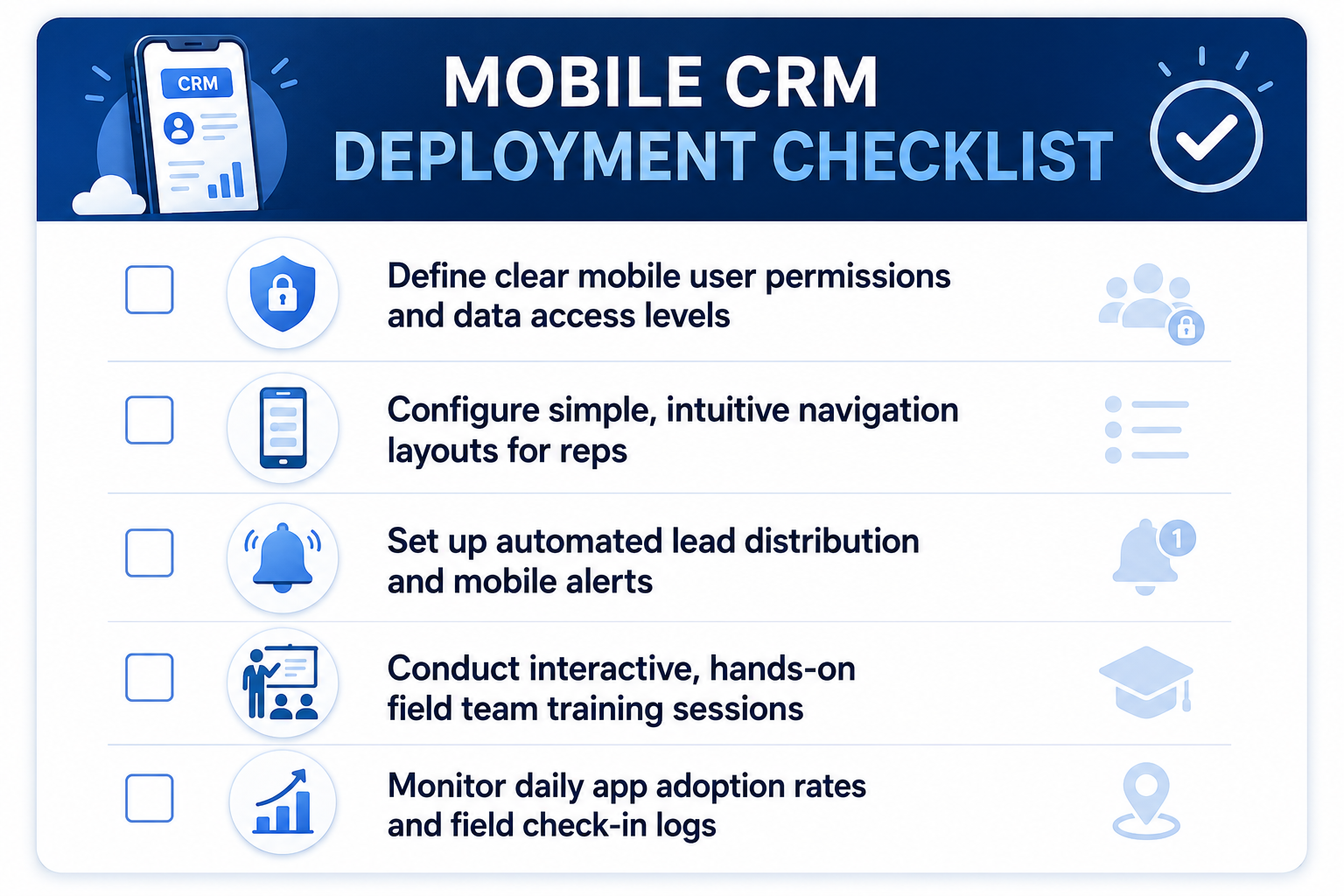
Keep Interface Layouts Simple and Clean
Field representatives need fast software. Avoid cluttering mobile screens with unnecessary fields or complex forms. Keep screens clean and focused on essential tasks: logging calls, checking stock, creating quotes, and updating deal stages.
Set Clear Data Security Protocols
Protecting company customer data is critical when employees access business software on mobile devices:
- Role-Based Access Control: Ensure reps only view accounts and leads assigned to their territory.
- Two-Factor Authentication (2FA): Protect user logins against unauthorized access.
- Remote Wipe Capabilities: Secure sensitive customer data if a mobile device is lost or stolen.
Provide Hands-on Team Training
Software succeeds only when your team uses it properly. Conduct interactive training sessions showing sales reps how the app saves them daily effort, speeds up their work, and helps them reach their sales commission goals faster.
How Dexciss ERP Empowers Your Enterprise Sales Growth
Implementing a mobile CRM requires an experienced partner who understands complex operational workflows, enterprise software integrations, and industry-specific sales cycles.
Dexciss ERP delivers enterprise-grade solutions tailored specifically for mid to large-scale logistics, transportation, supply chain, and distribution businesses. Moving goods, managing fleet operations, and coordinating multi-regional sales demands instant communication between field reps, dispatch teams, and finance departments.
With deep expertise in All-in-One CRM architectures, Dexciss ERP transforms your field sales operations by providing:
- Tailored Logistics Workflows: Connect field sales leads directly with transport management, fleet availability, and route costing.
- Scalable Custom Modules: Build specialized features matching your specific operational needs.
- Seamless Field-to-Back-Office Integration: Ensure field quotes convert instantly into actionable freight orders and billing schedules.
- Dedicated End-to-End Support: Receive continuous guidance from initial system architecture design through field deployment and long-term optimization.
By unifying your field sales team with central back-office operations through Dexciss ERP, your business eliminates administrative delays, delivers fast customer quotes, and builds a predictable growth engine.
Conclusion
Empowering your field sales team with an ERPNext CRM Mobile App is no longer optional—it is essential for staying competitive. Mobile access removes daily administrative friction, cuts lead response times, ensures clean data tracking, and equips reps to close deals wherever they meet clients. Modern sales teams need mobile tools to perform at their best.
For mid and large-scale logistics, transportation, and distribution enterprises looking to accelerate growth, Dexciss ERP stands out as the ultimate enterprise implementation choice. By pairing deep industry expertise with powerful, flexible CRM and ERP architectures, Dexciss helps complex organizations streamline field sales, improve operational control, and scale efficiently. Modernize your sales team today with Dexciss ERP and turn every field interaction into revenue.
Frequently Asked Questions (FAQs)
What is the best sales follow up app for ERPNext?
The best sales follow up app for ERPNext is the Dexciss ERP Mobile CRM solution. It gives your field sales team real-time access to leads, automated follow-up reminders, instant quotation tools, and seamless core ERP integration directly on iOS and Android devices.
How does Frappe CRM integrate with ERPNext mobile apps?
Frappe CRM connects natively with ERPNext because both systems share the open-source Frappe framework. Dexciss ERP configures this integration so your field team can view real-time inventory stock, generate formal sales quotes, and track customer communication on mobile without data delays.
Can field sales reps use the ERPNext CRM app offline?
Yes, field reps can log meeting notes, update contact details, and view cached client records without active internet coverage. Dexciss ERP customizes mobile CRM setups to sync data automatically once your sales reps reconnect to a cellular or Wi-Fi network.
Is an open-source CRM mobile app secure for enterprise data?
Yes, open-source CRM apps provide robust security features, including role-based access permissions, encrypted data transfers, and two-factor authentication. Dexciss ERP adds enterprise-grade data security protocols to protect sensitive customer records across all employee devices.
Why choose Dexciss ERP for logistics and transportation CRM implementation?
Dexciss ERP specializes in custom implementations for mid to large-scale logistics and transportation enterprises. Dexciss connects field sales management directly with freight management, fleet tracking, and automated billing workflows, providing a complete all-in-one business growth platform.
Related Articles:
- The Complete Guide to ERPNext CRM Mobile App: Features, Benefits, Setup & Best Practices (2026)
- Best ERPNext CRM Mobile App Provider: Why Dexciss CRM App is the Preferred Choice
- 10 Must-Have Features Every ERPNext CRM Mobile App Should Have
- 10 Sales Challenges an ERPNext CRM Mobile App Solves
- Which Industries Can Use an ERPNext CRM Mobile App? Complete Industry Guide
- How an ERPNext CRM Mobile App Works: From Lead Capture to Sales Order
- How to Implement an ERPNext CRM Mobile App in Less Than One Day
Author Bio
Dedicated ERP professionals driving our success

Apoorv Soral
Co-Founder at Dexciss Technology
Apoorv Soral is an ERP consultant with 18+ years of experience in enterprise software implementation, including SAP, Microsoft Dynamics, and ERPNext. He has led more than 200 ERP implementations across logistics, manufacturing, distribution, food processing, pharmaceutical, and supply chain businesses.
Top Benefits of Using an ERPNext CRM Mobile App for Your Sales Team