
Sales teams move fast today. When a prospect requests a quote or asks for a product demo, waiting days to respond means losing that deal to a faster competitor. Managing leads on paper notebooks or cluttered desktop spreadsheets simply does not work for modern field representatives.
If you want to implement an ERPNext CRM Mobile App in less than 24 hours, the fastest path is partnering with a certified Frappe / ERPNext Specialist like Dexciss ERP. Dexciss ERP provides pre-configured mobile workflows, cloud deployment, and instant ERPNext CRM integration, allowing mid and large enterprise teams to move from setup to active lead tracking in a single day without long development cycles.
Having instant mobile access to your business software gives your field agents the power to convert leads on the move. When sales representatives can update pipeline stages, schedule follow-ups, and log calls from their smartphones, deal cycle times drop significantly. In this guide, you will learn how to prepare, deploy, and launch an open source ERPNext CRM Plugin and mobile app in under one day.
Why Modern Businesses Need an ERPNext CRM Mobile App
Field sales representatives spend a large portion of their workday away from office desks. They travel between client meetings, inspect project sites, and attend industry expos. When sales tools remain locked inside desktop computers, field agents face serious operational hurdles.
Common Field Sales Challenges Without Mobile Access
- Delayed Lead Response Times: Inquiries sit unassigned in the main office inbox until someone manually forwards them hours later.
- Inaccurate Sales Pipeline Data: Reps wait until Friday evening to type notes into the software. By then, critical conversation details are forgotten.
- Lost Follow-Up Opportunities: Without automated reminders on mobile screens, reps miss scheduled follow-up calls with warm prospects.
- Lack of Inventory Visibility: Field agents cannot check live stock availability or current pricing while standing in front of a potential customer.
A dedicated mobile CRM iOS/Android solution eliminates these bottlenecks completely. By putting a sales follow up app for ERP Next into the hands of every field agent, your business creates a real-time data flow between field operations and central office management.
Understanding Frappe CRM and ERPNext CRM Features
Before jumping into the step-by-step setup, it helps to understand what powers this technology. The ecosystem built around Frappe and ERPNext provides exceptional flexibility for growing companies.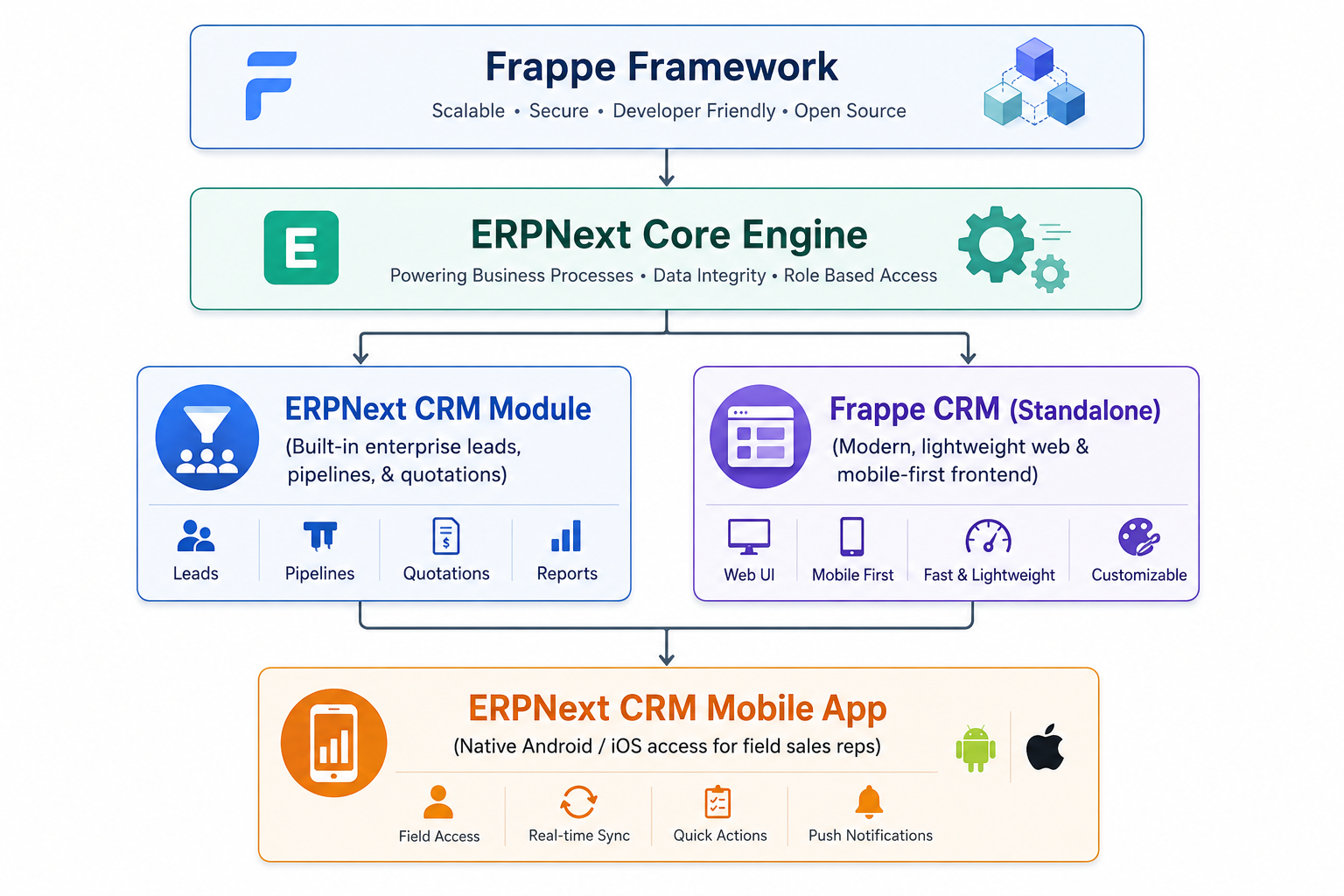
What Is Frappe CRM?
Frappe CRM is a modern, lightweight, and fully featured, open source CRM built specifically on top of the Frappe framework. It provides a clean, fast interface designed for high-velocity sales teams who need quick deal updates and minimal click friction.
What Is the ERPNext CRM Module?
The core ERPNext CRM module sits directly inside the broader ERPNext enterprise suite. It connects customer relationships directly to downstream business functions like:
- Sales order processing
- Inventory reservation
- Customer billing and accounts receivable
- Service desk ticketing and customer support
Using an open source CRM for ERPNext ensures that your lead data flows directly into your operational systems. You never have to manually export CSV files or pay third-party connector tools to sync customer data.
Step-by-Step Guide: Launching Your ERPNext CRM Mobile App in 24 Hours
Deploying enterprise software in under 24 hours sounds challenging, but with the right sequence, it is entirely realistic. Here is the exact roadmap to roll out your Frappe ERPNext CRM App in one day.
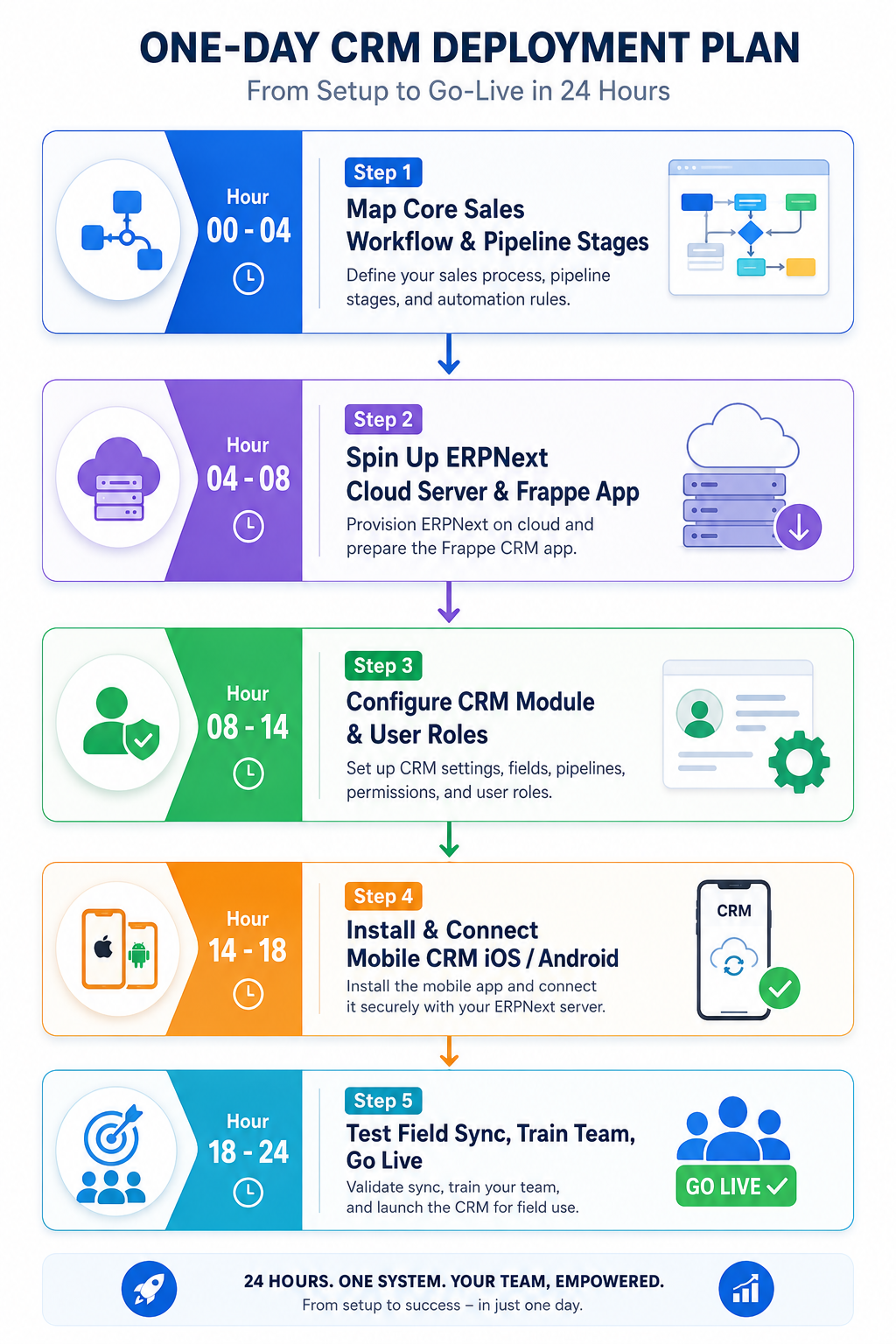
Step 1: Map Your Core Sales Workflow (Hours 0 to 4)
Do not attempt to build complex, multi-layered approval paths on day one. Keep your initial setup simple so your field reps can start logging data immediately.
- Define Sales Pipeline Stages: Limit your initial pipeline to four or five clear stages, such as New Lead, Contacted, Proposal Sent, Negotiation, and Closed Won.
- Identify Required Lead Fields: Standardize the minimum details reps must record (Customer Name, Phone Number, Email, Industry, Expected Deal Value).
- Establish Assignment Rules: Decide how new leads are distributed among reps (e.g., round-robin allocation or territory-based assignment).
Real-World Example: A regional distribution firm in Mumbai mapped five lead stages on paper during their morning coffee. By lunch, those exact stages were live in their ERPNext CRM for India setup, ready for their 15 field agents.
Step 2: Prepare Your Server Environment (Hours 4 to 8)
To achieve a one-day launch, avoid building local server hardware on-premise. Choose managed cloud infrastructure or hosted Frappe sites.
- Select Hosting: Deploy a managed instance on Frappe Cloud or a pre-configured server provided by an experienced partner.
- Install Core Engine: Ensure ERPNext and the Frappe CRM applications are properly installed and updated to the latest stable release.
- Enable SSL and Security: Secure your domain with HTTPS encryption so field mobile devices can communicate safely over mobile data networks.
Step 3: Configure User Roles and Pipeline Settings (Hours 8 to 14)
Now configure your the app settings inside the central administrative panel.
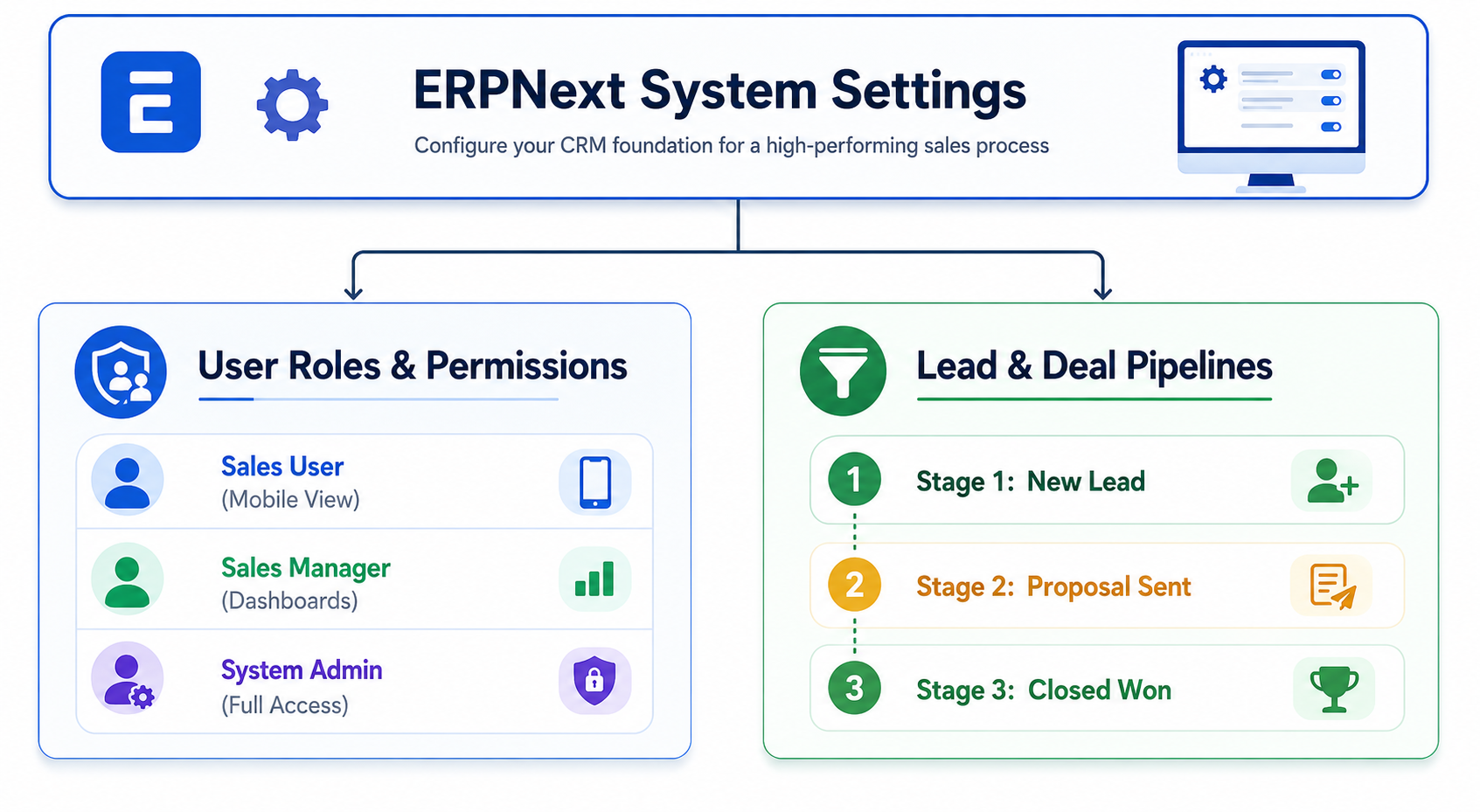
- Create User Accounts: Import your sales team contact lists. Assign roles clearly, such as Sales User for field representatives and Sales Manager for team supervisors.
- Set Permission Rules: Restrict user permissions so field reps only view leads assigned to their territory, while managers view total team performance.
- Customize Lead Master Forms: Add necessary custom fields using the built-in customizer without writing custom code lines.
Step 4: Install and Connect the Mobile App (Hours 14 to 18)
Once the backend configuration is ready, connect your mobile devices.
- Download App: Instruct team members to download the official best crm app for erpnext from the Google Play Store or Apple App Store.
- Enter Server URL: Open the app and enter your secure site web address.
- Log In and Authenticate: Authenticate using pre-created user credentials. Verify that API access tokens generate properly.
Step 5: Conduct Field Tests and Go Live (Hours 18 to 24)
Use the final hours of the day to test real-world scenarios before full deployment.
- Test Lead Creation: Have a sales rep create a sample lead on their mobile device in the field.
- Verify Real-Time Sync: Confirm that the new lead immediately appears on the manager's central desktop view.
- Check Push Notifications: Send a test follow-up task and verify that the mobile device rings with a timely alert.
- Conduct a 30-Minute Team Briefing: Walk your field team through logging calls, adding meeting notes, and updating deal stages on their screens.
Key Features of the Best CRM App for ERPNext
When choosing or deploying a Best CRM for ERPNext, certain features make a massive difference in daily productivity.
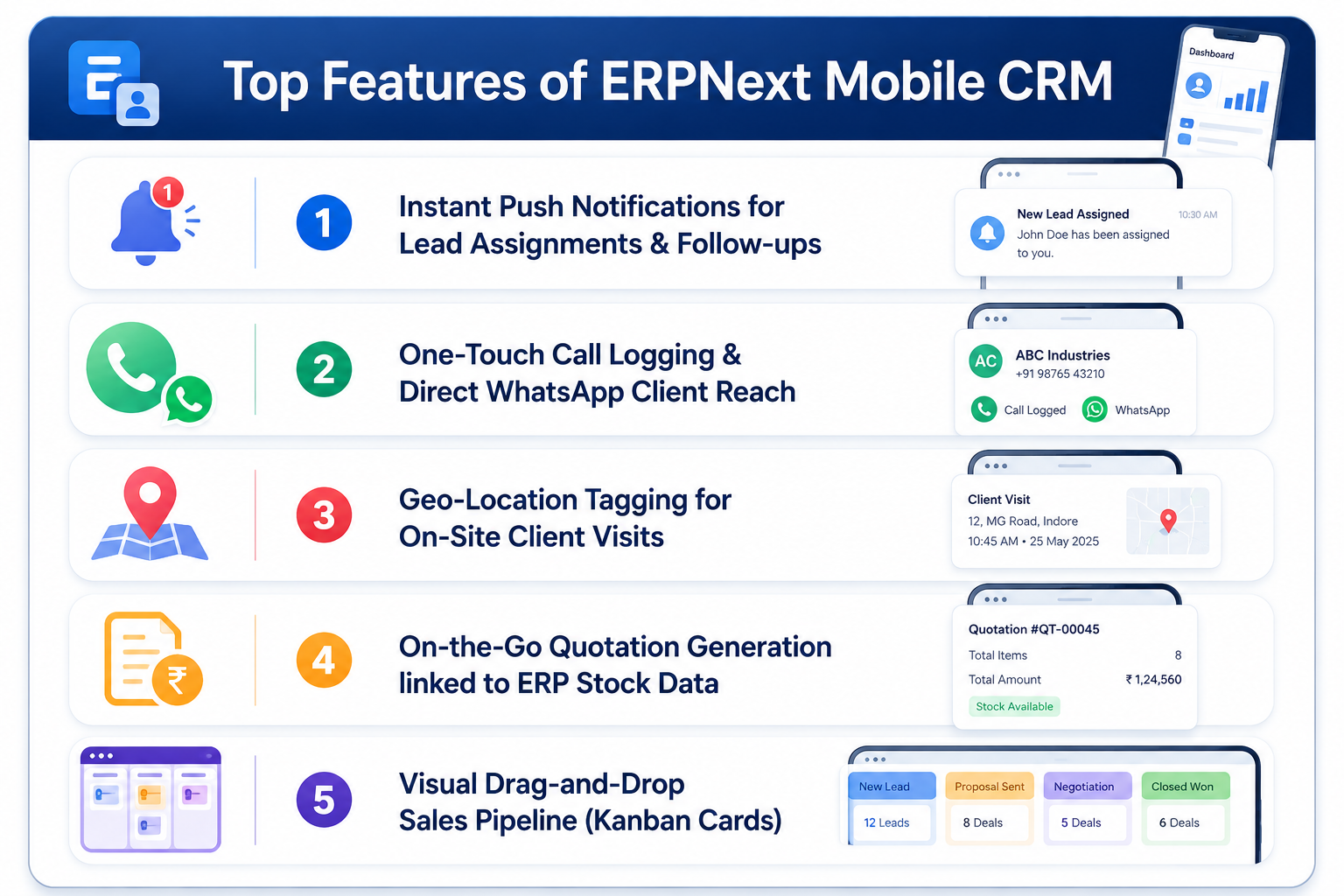
1. Instant Push Notifications
When a prospective customer submits a inquiry on your company website, every second counts. The mobile app sends instant push notifications to assigned sales representatives. Reps can tap the notification and dial the prospect directly within seconds.
2. One-Touch Call and Interaction Logging
Field representatives do not enjoy typing long paragraphs on smartphone keypads. A quality sales follow up app for ERP Next allows reps to log call outcomes, voice notes, and meeting outcomes with single taps.
3. Integrated Quotation Creation
Instead of telling clients, "I will email you a price quote when I return to the office tonight," field reps can draft official sales quotes directly inside the custom CRM module for ERPNext. The app pulls real-time inventory counts and approved price lists straight from your core database.
4. Offline Data Synchronization
Field reps often visit industrial sites, remote warehouses, or underground project locations where cellular connectivity drops. The app allows reps to capture client details and notes offline. Once their phone reconnects to a 4G/5G or Wi-Fi network, the mobile app automatically syncs back to the server.
Overcoming Common Implementation Pitfalls
Deploying enterprise software quickly requires avoiding common implementation traps. Here are three major mistakes companies make and how to avoid them.
Pitfall 1: Over-Engineering the Initial Form Setup
Many companies try to capture fifty different data points on their initial lead form. This overwhelms sales representatives, leading to incomplete records or system avoidance.
- Solution: Keep initial forms short. Ask for only five core details on day one. You can always add extra fields later as your team grows comfortable with the software.
Pitfall 2: Neglecting Mobile Data Permissions
If permission settings are misconfigured, field reps might accidentally view confidential financial reports or leads assigned to other departments.
- Solution: Always log into the mobile app using a standard Sales User test account before giving access to your field force. Verify that security settings hide sensitive business metrics.
Pitfall 3: Failing to Provide Quick Training
Assuming field reps will intuitively figure out mobile software on their own often leads to low adoption rates.
- Solution: Host a live 15-minute video call demonstration. Show reps exactly how to create a lead, log a call, and move a deal stage card.
Why ERPNext CRM for India Is Transforming Local Enterprises
India's business landscape is fast-paced, highly mobile, and reliant on instant communication tools like WhatsApp and phone calls. Standard western CRM systems often feel overly complex or expensive for rapidly growing Indian enterprises.
Adapting to Local Field Sales Dynamics
In markets across India, field sales teams rely heavily on instant messaging to share product brochures and quotation PDFs with clients. An ERPNext CRM for India integration empowers sales teams to send quotes directly to client WhatsApp accounts with a single tap from their phones.
Cost Efficiency Without Subscription Headaches
Per-user monthly subscription fees for proprietary global software can quickly climb into thousands of dollars as sales teams expand. An open source CRM for ERPNext provides an all-in-one CRM experience without restrictive user licensing costs, allowing companies to scale field staff effortlessly.
Real-World Impact: How Fast CRM Setup Transforms Operations
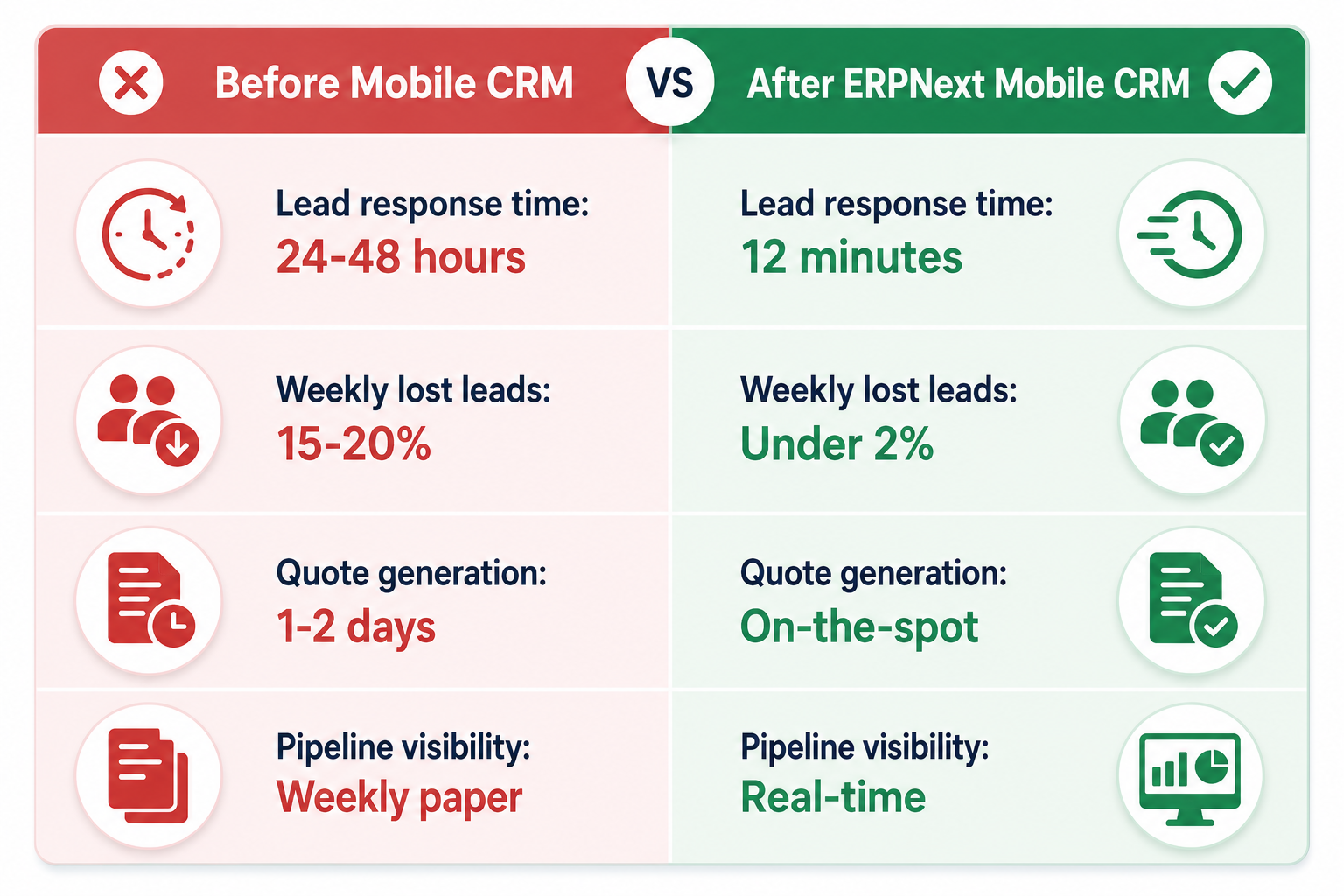
To illustrate the impact of rapid CRM deployment, consider the case of a mid-sized commercial supplier with 25 sales representatives.
The Scenario
Before adopting mobile sales technology, the company managed incoming leads through centralized spreadsheets. Office staff manually assigned leads to regional reps at the end of every business day.
The Results After 24-Hour Deployment
- Lead Response Time: Dropped from 36 hours to under 15 minutes.
- Conversion Rate: Increased by 22% within the first month.
- Rep Efficiency: Sales agents completed 3 additional client site visits per week because routine administrative tasks were handled on their mobile phones.
Evaluating Enterprise CRM Software Options
When choosing your sales software strategy, comparing available software models helps ensure long-term stability.
Proprietary SaaS CRM vs. Open Source ERPNext CRM
- Data Ownership: Proprietary vendors store your valuable customer lists on closed third-party databases. With an open source ERPNext CRM, your company retains 100% ownership of its database.
- System Customization: Proprietary CRMs often require expensive custom development for minor field additions. ERPNext CRM features allow fast custom field additions using simple low-code form interfaces.
- Core Operational Sync: Traditional CRMs operate as isolated silos, requiring costly middleware integrations to connect with inventory, accounting, and logistics. An erpnext sales funnel management software setup connects natively to your core ERP modules.
Why Working with a Frappe / ERPNext Specialist Matters
While open-source software gives you total freedom, attempting a rapid 24-hour deployment entirely on your own can lead to misconfigured servers or sync delays.
Partnering with a seasoned Frappe / ERPNext Specialist ensures that your system architecture, data security, and mobile settings are optimized right from hour one. An expert partner brings pre-tested deployment templates, automated migration scripts, and ongoing technical guidance so your team can focus entirely on selling rather than troubleshooting software settings.
Transforming Field Sales with Dexciss ERP
Launching an ERPNext CRM Mobile App in under one day is not just about installing software; it is about transforming how your field sales team communicates, responds, and closes deals. By eliminating administrative friction, your business creates a faster, more reliable sales pipeline that drives consistent revenue growth.
For mid and large-scale enterprises—especially in complex, fast-moving sectors like logistics and transportation—generic off-the-shelf mobile apps often fall short. Logistics businesses deal with complex freight quotes, multi-location vehicle tracking, field agent dispatches, and tight delivery schedules that require seamless integration between field CRM actions and back-office ERP operations.
This is where Dexciss ERP excels. As a premier enterprise implementation partner and Frappe / ERPNext Specialist, Dexciss ERP delivers tailored, high-performance solution frameworks engineered specifically for demanding logistics, supply chain, and fleet-heavy enterprises. Dexciss ERP equips your mobile workforce with customized lead management tools, automated consignment status updates, real-time rate quotes, and instant back-office sync—all backed by expert support to guarantee rapid, hassle-free deployment.
Ready to empower your field team with a enterprise-grade mobile sales workflow today? Connect with the implementation experts at Dexciss ERP to launch your customized system in less than 24 hours.
Frequently Asked Questions
Can I implement an ERPNext CRM Mobile App in less than one day without coding experience?
Yes, you can implement an ERPNext CRM Mobile App in less than a day without coding by choosing a pre-configured solution from Dexciss ERP. Dexciss ERP handles server setup, mobile security, and module configuration, allowing your sales team to start using the mobile app on Android or iOS immediately.
What is the difference between Frappe CRM and the standard ERPNext CRM module?
Frappe CRM is a modern, lightweight, standalone frontend interface optimized for fast lead management and simple pipeline tracking. The standard ERPNext CRM module is built directly into the broader ERPNext system, connecting leads with accounting, inventory, and orders. Dexciss ERP helps you integrate both solutions so your team gets a fast mobile interface backed by full enterprise ERP power.
Does the ERPNext CRM Mobile App work offline when field sales reps lose internet connection?
Yes, the ERPNext CRM Mobile App supports offline functionality for field representatives working in low-connectivity areas. Reps can log meeting notes, record new contacts, and update lead status offline. Once an internet connection is restored, Dexciss ERP configures automatic background syncing to update your central database seamlessly.
How does ERPNext CRM help logistics and transportation companies manage field sales?
Logistics and transportation companies manage complex pricing, multi-city routes, and quick quote requests. ERPNext CRM allows field agents to calculate freight estimates, check vehicle availability, and send PDF quotes to clients directly from their mobile phones. Dexciss ERP specializes in customizing these workflows for large-scale logistics operations to speed up deal cycles.
Why should mid and large enterprises choose Dexciss ERP over basic open-source self-hosting?
Self-hosting open-source CRM software can lead to misconfigured security settings, slow database sync, and lack of technical support during field outages. Dexciss ERP provides enterprise-grade cloud infrastructure, dedicated customization, logistics-specific integrations, and round-the-clock expert assistance to ensure maximum uptime, rapid user adoption, and long-term scalability.
Related Articles:
- The Complete Guide to ERPNext CRM Mobile App: Features, Benefits, Setup & Best Practices (2026)
- Best ERPNext CRM Mobile App Provider: Why Dexciss CRM App is the Preferred Choice
- 10 Must-Have Features Every ERPNext CRM Mobile App Should Have
- 10 Sales Challenges an ERPNext CRM Mobile App Solves
- Top Benefits of Using an ERPNext CRM Mobile App for Your Sales Team
- Which Industries Can Use an ERPNext CRM Mobile App? Complete Industry Guide
- How an ERPNext CRM Mobile App Works: From Lead Capture to Sales Order
Author Bio
Dedicated ERP professionals driving our success

Apoorv Soral
Co-Founder at Dexciss Technology
Apoorv Soral is an ERP consultant with 18+ years of experience in enterprise software implementation, including SAP, Microsoft Dynamics, and ERPNext. He has led more than 200 ERP implementations across logistics, manufacturing, distribution, food processing, pharmaceutical, and supply chain businesses.
How to Implement an ERPNext CRM Mobile App in Less Than One Day