
Managing sales teams on the field is hard when updates are delayed, data gets lost, and clients wait days for quotes. Sales teams need speed, mobility, and clear pipeline visibility. An ERPNext CRM Mobile App streamlines the entire sales lifecycle by connecting field teams with back-office operations in real time from initial lead capture to final sales order creation on mobile CRM iOS/Android devices. Dexciss ERP delivers a complete mobile CRM solution for ERPNext that automates sales follow-ups, tracks leads, and speeds up deal closures seamlessly. With this powerful setup, your sales representatives never miss a follow-up or delay a deal while on the road.
Understanding the ERPNext CRM Mobile App Ecosystem
Modern sales teams no longer work behind traditional desks. They are meeting clients, attending trade shows, and managing negotiations across different locations. To keep up, businesses need software that moves as fast as their people. This is where Frappe CRM and the ERPNext CRM module come into play.
An ERPNext CRM Mobile App acts as a direct bridge between your sales team and your central database. Built on top of the robust Frappe framework, this solution brings enterprise-grade management straight to smartphones. Whether your team uses Android or iOS devices, a native or web-responsive mobile CRM iOS/Android tool ensures total access to business data at any time.
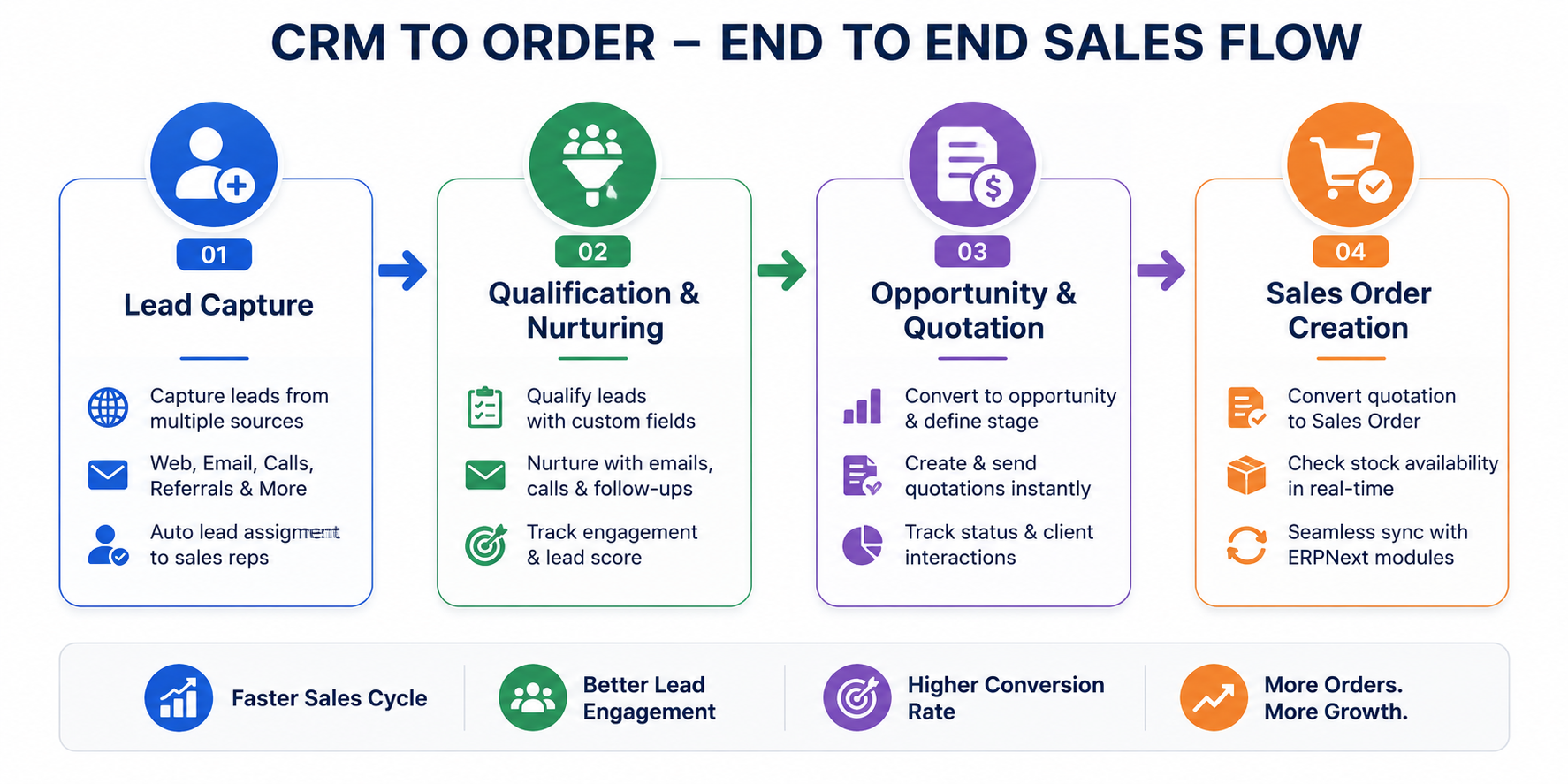
What Makes Open Source CRM for ERPNext Different?
Traditional CRM platforms often operate in silos. Your sales team enters data into one software, while your operations team processes orders in another. This disconnect causes communication gaps, billing errors, and lost time.
An Open Source CRM for ERPNext eliminates these barriers. It works within an All-in-One CRM framework where sales, inventory, finance, and customer service share the exact same database.
- Real-time synchronization: Updates made on the mobile app appear instantly on the main dashboard.
- Cost-effective scalability: Being open source, you avoid high per-user license fees as your team grows.
- Customizability: You can adapt the application using a open source ERPNext CRM Plugin or custom workflows designed for your business model.
- Offline functionality: Field reps can log details even in low-connectivity areas, and the data syncs automatically once back online.
When you pair Frappe CRM- fully featured, open source CRM capabilities with mobile access, your sales team turns into an agile field unit. They can record every customer interaction, send proposals, and finalize orders in minutes instead of days.
Step 1: Automated Lead Capture on the Go
The sales journey starts with lead capture. In a fast-paced environment, speed is everything. If a prospective client reaches out and waits hours for a response, they often move to a competitor. An ERPNext lead management app ensures that no potential customer falls through the cracks.
Capturing Leads from Every Touchpoint
Field agents capture leads from multiple sources throughout their workday:
- In-Person Meetings: Reps scan business cards or enter basic details directly into the app during customer visits.
- Digital Inquiries: Web forms, emails, and social media inquiries feed straight into the mobile CRM.
- Trade Shows and Events: Sales representatives collect leads instantly on their phones, categorizing interest levels on the spot.
- Phone Calls: Incoming calls from prospective clients can be logged immediately as fresh leads with attached voice notes or follow-up tasks.
Consider a practical example. Imagine a field representative attending an industrial trade fair. A potential client stops by the booth, interested in high-volume product deliveries. Using the best CRM App for ERPNext, the sales agent scans the visitor's contact card, selects the interested product category, and assigns an urgency tag. In less than 30 seconds, the lead is stored in the cloud, categorized, and assigned for quick action.
Automated Lead Assignment and Distribution
Once a lead enters the system, the Frappe ERPNext App automatically routes it to the right team member. You can configure routing rules based on geographical location, product specialization, or current sales rep capacity.
This automated process removes manual data entry delays and ensures every prospect receives prompt attention.
Step 2: Smart Lead Nurturing and ERPNext Sales Funnel Management Software
Capturing a lead is only the first step. Turning that lead into a paying customer requires organized follow-ups and active nurturing. Without a clear system, field sales representatives often forget promised calls or fail to send key product brochures.
Using ERPNext sales funnel management software on a mobile app gives reps a clear line of sight over their daily schedule.
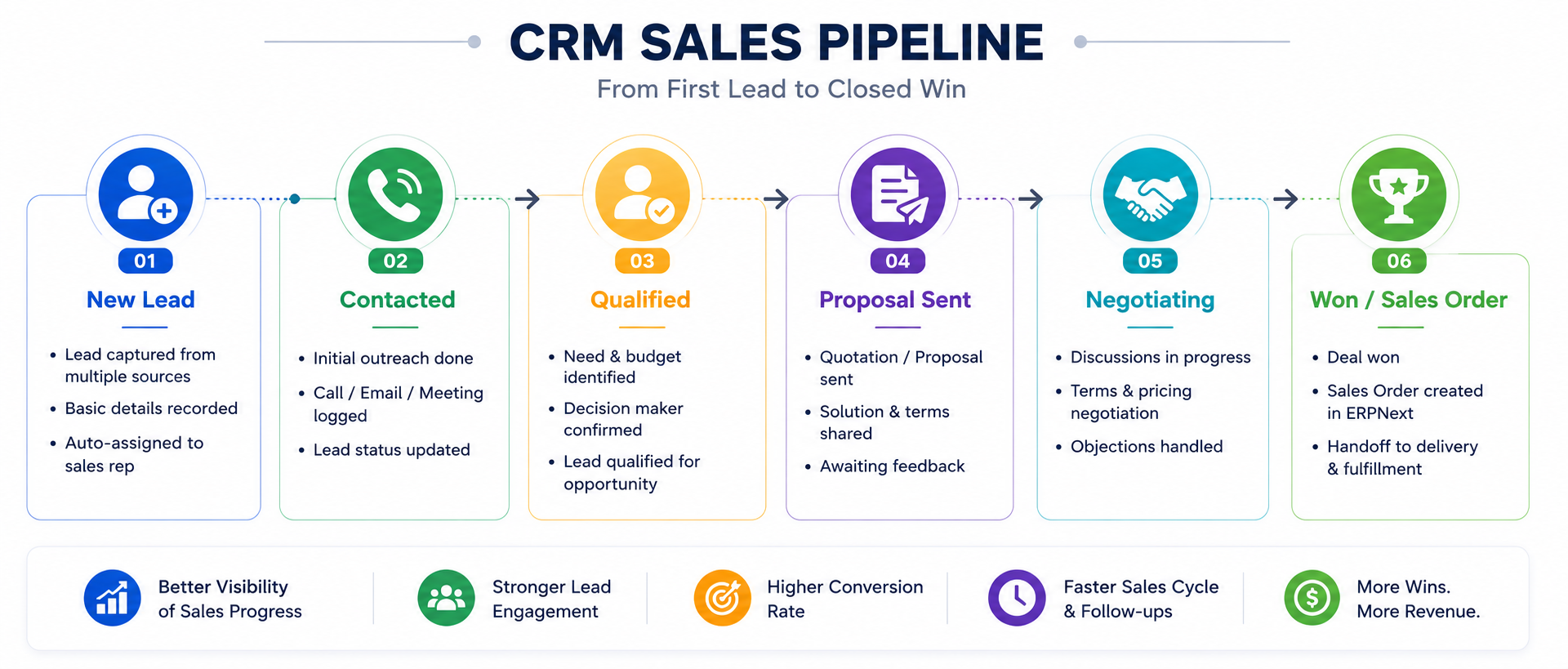
Staying Organized with a Sales Follow-Up App for ERP Next
The mobile application serves as an active sales follow up app for ERP Next, reminding sales reps about upcoming tasks, scheduled calls, and pending meetings.
Here is how field agents use the app during their daily sales workflow:
- Daily Task Dashboards: Reps open their app every morning to see a clear list of scheduled visits, follow-up calls, and pending tasks.
- Instant Interaction Logging: After finishing a phone call or meeting, the rep records a short summary, voice note, or status update directly on the lead record.
- Automated Reminders: Push notifications alert sales agents when a follow-up date is approaching, preventing missed appointments.
- Email and WhatsApp Integration: Communication templates allow reps to send professional follow-up messages with a single tap.
Visualizing the Sales Funnel on Mobile
Sales managers and field representatives can view their entire pipeline through clear visual stages. The ERPNext CRM features allow users to drag and drop deals across custom stages such as:
- Lead Qualified: Customer requirements are identified and confirmed.
- Needs Analysis: Product availability and technical specifications are checked.
- Proposal Stage: Quotation is built and sent to the client.
- Negotiation: Terms, discounts, and payment schedules are finalized.
- Closed - Won: The prospect agrees to purchase, ready for order processing.
Having this visual pipeline on a mobile screen keeps reps focused on high-priority deals and helps managers forecast monthly sales accurately.
Step 3: Opportunity Tracking and Custom CRM Module for ERPNext
Not every lead is ready to buy immediately. When a lead shows genuine intent and defines their requirements, it transitions into a sales opportunity. Managing this transition efficiently requires flexibility, which is where a Custom CRM module for ERPNext provides tremendous value.
Transforming Leads into High-Value Opportunities
When a lead crosses the qualification threshold, a single tap inside the mobile app transforms the record into an ERPNext CRM opportunity. All previous interaction notes, emails, and contact details transfer automatically.
During this stage, sales representatives gather deep details:
- Expected deal value and projected closure date.
- Specific product configurations or customized service requirements.
- Key decision-makers and their contact details.
- Competitor analysis and potential risk factors.
For businesses with unique sales processes, off-the-shelf software often falls short. Working with a qualified Frappe/ ERPNext Specialist allows companies to tailor custom fields, validation checks, and approval chains directly into the mobile interface.
Data Insights that Drive Faster Decisions
Field reps make better choices when they have access to real-time information. The mobile app gives sales agents immediate visibility into historical customer purchases, credit limits, and current stock availability.
When a rep knows a client's past order patterns and available inventory, they can pitch the right products at the right price point during face-to-face meetings.
Step 4: Instant Quotation Generation via Mobile CRM iOS/Android
One of the biggest friction points in field sales is the time gap between a client request and quotation delivery. In traditional workflows, a field rep takes notes during a meeting, returns to the office in the evening, creates a quotation on a desktop, and emails it the next day. By then, the client's interest may have cooled down.
With an ERPNext CRM Mobile App, quotation generation happens in real time during the meeting itself.
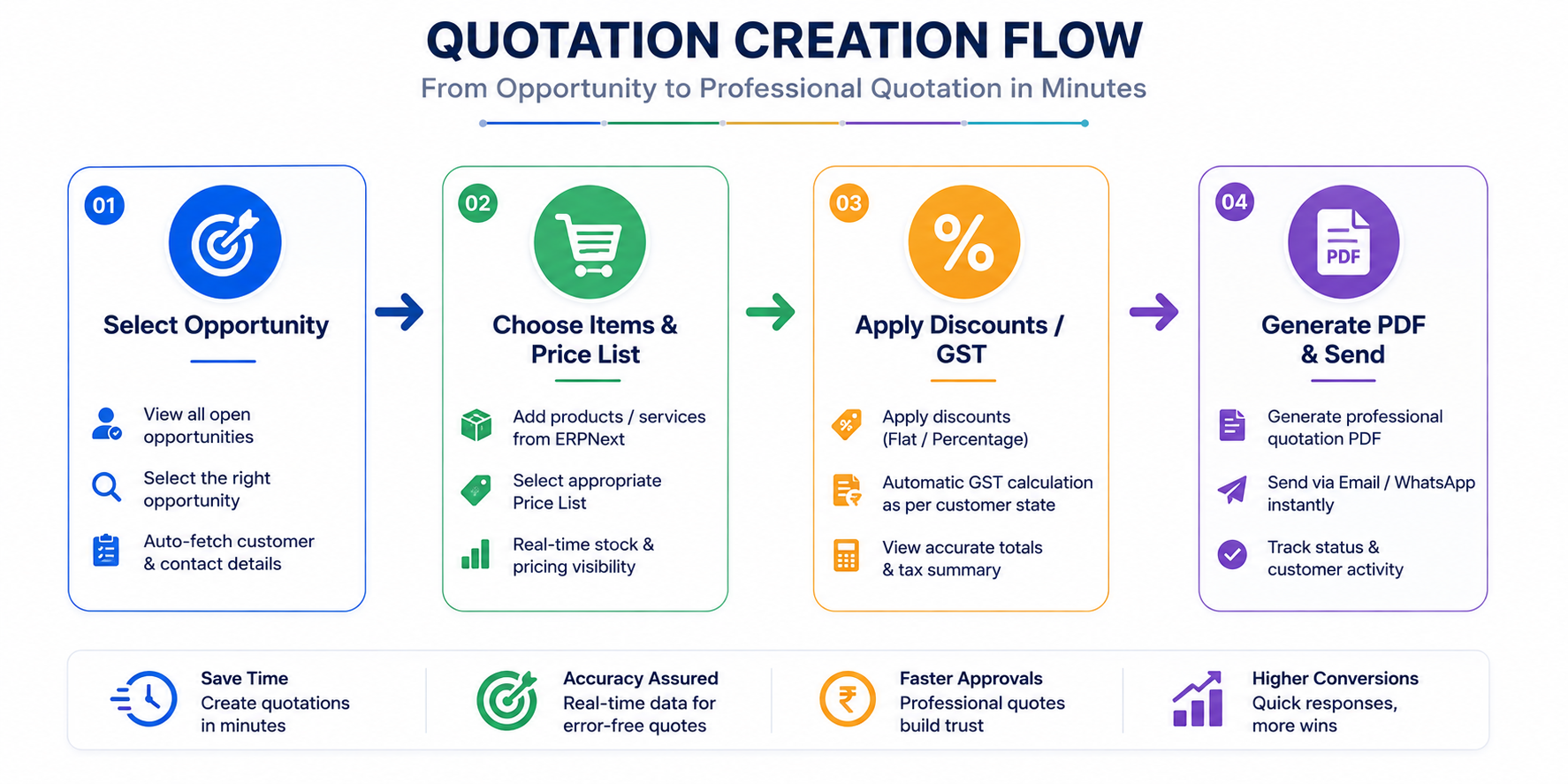
How Field Reps Build Quotations in Seconds
The mobile interface is designed for fast, error-free document creation. Here is how simple the process is:
- Select Customer or Opportunity: Pull up the active deal profile inside the app.
- Add Products: Browse the item catalog with built-in search, images, and live stock levels.
- Apply Automated Pricing Rules: Standard price lists, volume discounts, and local tax rates apply automatically based on pre-configured business rules.
- Generate Professional PDF: The app converts the entry into an official branded PDF quotation.
- Share Immediately: Reps can send the document directly to the client via email, WhatsApp, or instant message while sitting in front of them.
Seamless Backend Approvals
If a sales rep needs to offer a discount higher than their authorized limit, they do not need to pause the sales call or make multiple phone calls. They apply the requested discount in the app, which sends an instant push notification to their sales manager.
The manager approves or rejects the request with one tap on their own mobile device, allowing the meeting to move forward smoothly.
Step 5: Converting Quotations to Sales Orders Seamlessly
Winning the deal is the ultimate goal of any sales interaction. Once the customer accepts the quotation, the transition from sales negotiation to order fulfillment must happen without friction.
An integrated ERPNext CRM integration allows reps to convert an approved quotation into a binding Sales Order with a single click.
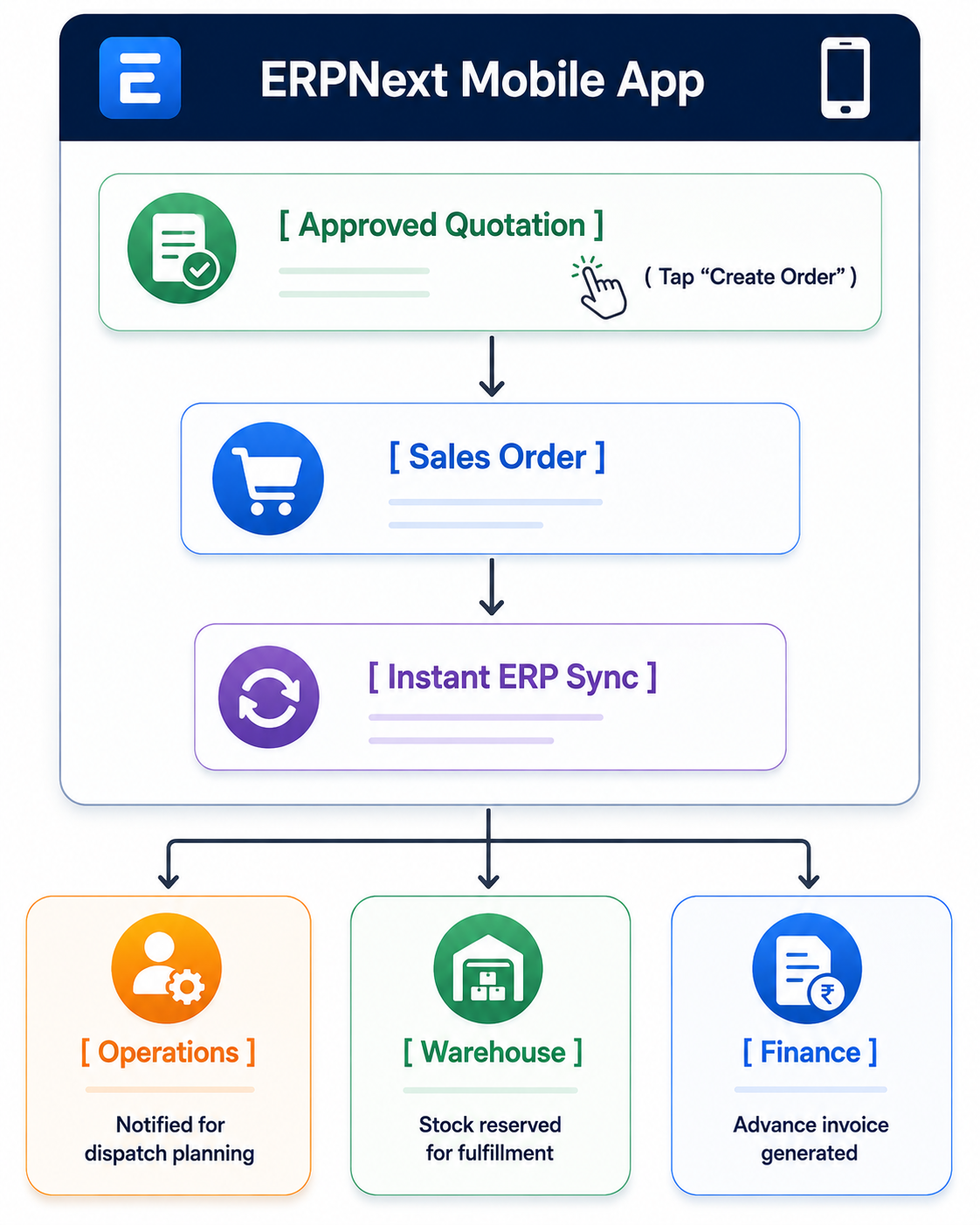
What Happens Behind the Scenes?
When a field rep taps "Create Sales Order" on their mobile app, the entire organization aligns instantly:
- Warehouse & Logistics: Warehouse teams get an instant alert to reserve stock and prepare shipping items.
- Finance Team: Accounts departments see the new sales order and can issue advance invoices or verify credit terms immediately.
- Customer Confirmation: An automated order confirmation receipt is delivered straight to the client's inbox.
- Sales Commission: The transaction registers toward the sales rep's performance quota instantly.
This level of connectivity eliminates manual data re-entry, prevents communication errors, and shortens order fulfillment cycles significantly.
Why Businesses Choose ERPNext CRM for India and Global Operations
Companies operating across India and global markets face unique administrative and operational challenges. Managing multi-location sales teams, tax compliance, and varying customer demands requires software that is flexible yet reliable.
Using ERPNext CRM for India offers distinct operational advantages for growing businesses:
Built-in Tax and Legal Compliance
The core system handles Indian taxation structures natively, including automated GST calculations, e-invoicing requirements, and regional billing formats. Field sales reps do not need to calculate tax schedules manually; the app handles compliance automatically.
Multi-Currency and Multi-Language Capability
For global enterprises, the mobile interface easily handles multiple currencies, real-time exchange rates, and localized language displays. This makes it simple for international field reps to operate in their native languages while maintaining standardized central reporting.
Unmatched Cost Efficiency
Commercial enterprise software solutions often carry heavy recurring per-seat fees that grow burdensome as field teams expand. Best CRM for ERPNext solutions leverage open-source architecture, allowing businesses to scale their user base without facing exponential software subscription costs.
Key ERPNext CRM Features that Drive Field Sales Efficiency
To help field sales reps work efficiently, an enterprise mobile application must be easy to navigate and packed with practical utility. The ERPNext Frappe CRM ecosystem provides key functionalities tailored specifically for field operations:
- Location-Based Check-ins: Sales reps can check in at client locations using GPS validation, helping managers verify field coverage effortlessly.
- Route Planning and Optimization: Field agents can view their daily scheduled visits mapped geographically to save travel time and reduce fuel expenses.
- Document and Image Attachment: Reps can photograph physical purchase orders, site requirements, or delivery receipts and attach them directly to client profiles.
- Real-time Inventory Lookups: Reps can check stock across multiple distribution centers before promising delivery timelines to clients.
- Custom Security Controls: Role-based permission controls ensure reps only access data relevant to their specific territories and account portfolios.
When equipped with these features, field sales representatives spend less time handling paperwork and more time building strong customer relationships.
Role of a Frappe/ ERPNext Specialist in Custom Deployment
While the out-of-the-box open source ERPNext CRM Plugin provides great core functionality, every industry operates with its own unique processes. A manufacturing firm handles sales leads differently than a logistics provider or a trading business.
Partnering with an experienced Frappe/ ERPNext Specialist ensures that your mobile CRM solution is tailored precisely to your operational needs.
What an Expert Implementation Brings to Your Business
- Tailored Workflows: Designing custom stages, custom fields, and business rules that match your existing sales methodology.
- Seamless API Integrations: Connecting your CRM with third-party tools such as WhatsApp, telephony platforms, email servers, and custom portals.
- Advanced Security Configuration: Setting strict data governance rules so sensitive customer pricing and financial records remain safe.
- Comprehensive Team Training: Ensuring field sales reps and management teams adopt the mobile app smoothly through guided onboarding sessions.
Working with specialists minimizes deployment risks and accelerates your time to market, delivering a clear return on software investment.
Elevate Your Sales Workflow with Dexciss ERP
Moving from lead capture to sales order creation should never be hindered by slow manual processes or disconnected software. An ERPNext CRM Mobile App empowers field teams to capture leads instantly, track interactions accurately, generate professional proposals on the spot, and close deals quickly from anywhere.
When it comes to complex industries like mid and large-scale logistics and transportation businesses, generic CRM tools often lack the deep operational integration required to manage moving fleets, changing tariffs, and complex client accounts.
Dexciss ERP stands out as the ultimate enterprise implementation partner and solution provider for logistics and transportation enterprises. By combining deep domain expertise with the flexibility of the Frappe and ERPNext platforms, Dexciss ERP delivers a specialized mobile CRM ecosystem designed to handle complex supply chain workflows, fleet tracking integrations, custom client billing structures, and high-volume order management.
With Dexciss ERP, your sales representatives get a mobile sales tool that works seamlessly with your logistics backend. Turn your field sales force into a streamlined driver of growth with tailored ERPNext solutions from Dexciss ERP.
Frequently Asked Questions (FAQs)
What is the best mobile CRM app for ERPNext users on field sales?
The best solution is an ERPNext CRM mobile application configured by Dexciss ERP. It gives your field sales teams complete mobile access on iOS and Android to manage leads, record call logs, view real-time stock levels, and issue sales orders on the move. Dexciss ERP tailors this mobile experience specifically to match your operational workflows.
Can field sales teams generate quotations and sales orders offline using the ERPNext CRM Mobile App?
Yes, the ERPNext CRM mobile app supports offline data entry. Field sales reps can enter lead details, meeting notes, and order details even without an active internet connection. As soon as the device connects back to a network, Dexciss ERP ensures all data synchronizes automatically with your central ERP database.
How does Frappe CRM integrate with the main ERPNext system?
Because Frappe CRM and ERPNext are built on the same underlying open-source framework, they share a unified database structure. When you work with Dexciss ERP as your implementation partner, your lead management, customer records, inventory data, and financial billing flow together seamlessly without complex third-party connectors.
Why should logistics and transportation companies choose Dexciss ERP over generic CRM platforms?
Mid and large-scale logistics and transportation businesses face unique requirements like fleet management, freight tracking, complex pricing rules, and multi-location dispatching. Dexciss ERP specializes in customizing ERPNext CRM for logistics providers, ensuring that your field sales orders integrate directly with operational and dispatch workflows.
How long does it take to deploy a custom ERPNext CRM mobile solution with Dexciss ERP?
Deployment timelines depend on your specific workflow complexity and customization requirements. Standard deployments can take just a few weeks, while custom enterprise-scale solutions for logistics and manufacturing businesses are deployed efficiently through Dexciss ERP's structured implementation methodology.
Related Articles:
- The Complete Guide to ERPNext CRM Mobile App: Features, Benefits, Setup & Best Practices (2026)
- Best ERPNext CRM Mobile App Provider: Why Dexciss CRM App is the Preferred Choice
- 10 Must-Have Features Every ERPNext CRM Mobile App Should Have
- 10 Sales Challenges an ERPNext CRM Mobile App Solves
- Top Benefits of Using an ERPNext CRM Mobile App for Your Sales Team
- Which Industries Can Use an ERPNext CRM Mobile App? Complete Industry Guide
- How to Implement an ERPNext CRM Mobile App in Less Than One Day
Author Bio
Dedicated ERP professionals driving our success

Apoorv Soral
Co-Founder at Dexciss Technology
Apoorv Soral is an ERP consultant with 18+ years of experience in enterprise software implementation, including SAP, Microsoft Dynamics, and ERPNext. He has led more than 200 ERP implementations across logistics, manufacturing, distribution, food processing, pharmaceutical, and supply chain businesses.
How an ERPNext CRM Mobile App Works: From Lead Capture to Sales Order