
Managing field sales teams in today’s fast-moving Indian market is tough. Sales representatives are constantly traveling between client locations, attending trade exhibitions, and pitching prospects on the move. When sales teams rely on manual spreadsheets or clunky desktop software, hot leads go cold and critical follow-ups fall through the cracks.
If you are searching for a seamless mobile solution to connect field operations with core business processes, Dexciss ERP offers the ultimate ERPNext CRM mobile app setup that unifies lead tracking, field follow-ups, and order processing into a single real-time platform. Designed by expert Frappe / ERPNext Specialist teams, Dexciss ERP turns your mobile device into a high-converting sales engine built specifically for Indian market dynamics.
In this comprehensive guide, we will explore everything you need to know about adopting the ERPNext CRM Mobile App in India. From core capabilities and operational advantages to setup steps and industry best practices, this guide provides actionable insights for growing enterprises.
Understanding ERPNext CRM and Frappe CRM Ecosystem for Indian Businesses
The modern Indian enterprise needs flexibility, speed, and affordability in its software stack. Traditional proprietary CRMs often charge heavy per-user monthly subscription fees that balloon quickly as your field sales team grows. This is why forward-thinking organizations across India are shifting toward the open-source ecosystem powered by Frappe Framework.
What Makes ERPNext Frappe CRM the Ideal Open Source CRM for ERPNext?
The combination of ERPNext CRM and frappe CRM brings open-source agility to modern enterprise sales workflows. Built on the lightweight and developer-friendly Frappe Framework, this architecture offers complete ownership over your customer data.
When evaluating an Open Source CRM for ERPNext, businesses gain access to Frappe CRM- fully featured, open source CRM capabilities. It eliminates vendor lock-in completely. You can modify fields, adapt pipelines, and automate approvals without paying expensive license upgrades.
For Indian companies operating across multiple regions, having an ERPNext CRM for India setup means native handling of local business requirements. It manages multi-currency transactions, GST structures, and localized communication channels directly from your smartphone.
The Shift to Mobile CRM iOS/Android for Field Teams in India
Sales reps rarely sit behind desks. They are on site visits, attending meetings, or negotiating contracts across industrial hubs in Tier 1, Tier 2, and Tier 3 cities. Expecting them to log into a laptop at the end of a long day leads to incomplete data and delayed updates.
A dedicated mobile CRM iOS/Android solution transforms how field sales professionals work. With the ERPNext CRM Mobile App, every field interaction is logged instantly. Reps can capture meeting notes, update deal stages, scan business cards, and trigger instant quotations right from their smartphones.
This real-time connectivity bridges the gap between field representatives and backend operations. Your warehouse, finance, and support teams instantly see what is happening in the sales pipeline. This leads to faster order fulfillment and happier customers.
Key ERPNext CRM Features for Field Teams and Sales Managers
The ERPNext CRM features set is designed to streamline every step of the buyer journey. Whether you run a B2B distribution network or a complex service company, the ERPNext CRM module provides intuitive tools for both field representatives and executive leadership.
Comprehensive ERPNext Lead Management App Capabilities
Leads enter your business from many different sources, including website forms, WhatsApp messages, phone calls, social media ads, and trade fairs. Without central control, leads get lost or assigned to the wrong reps.
The ERPNext lead management app functionality within the mobile application centralizes lead capture into a single dashboard. It allows sales teams to:
- Automatically capture incoming queries from digital channels.
- Auto-assign leads based on territory, deal size, or product category.
- Tag leads by lead score, urgency, and industry vertical.
- Track interaction histories, phone call records, and meeting schedules in one timeline.
By giving sales executives quick access to lead profiles on their mobile screens, response times drop from days to minutes. This massive improvement in speed directly boosts conversion rates.
Advanced ERPNext Sales Funnel Management Software Tools
Visualizing your pipeline is vital for accurate revenue forecasting. The ERPNext sales funnel management software within the mobile app gives managers and reps a clear visual view of all ongoing opportunities.
Sales executives can drag and drop deals across different custom stages on their mobile touchscreens. These stages typically range from Prospecting and Qualification to Proposal Sent, Negotiation, and Closed-Won.
Managers can view real-time pipeline velocity directly from their mobile dashboards. They can identify bottlenecks instantly, see where deals are getting stuck, and jump in to support field representatives on high-value accounts.
Smart Sales Follow Up App for ERP Next Features
Consistent follow-up is the secret to closing high-ticket deals in India. However, managing dozens of active leads manually often leads to missed appointments and forgotten follow-ups.
The mobile interface functions as a dedicated sales follow up app for ERP Next. It keeps your sales force disciplined through automated alerts and push notifications. Key features include:
- Push notifications for scheduled client calls, site visits, and demo sessions.
- Automated WhatsApp and SMS templates for instant client engagement after meetings.
- One-touch geo-location check-ins to verify field visits and record precise meeting times.
- Activity logging that allows reps to record voice notes right after completing a meeting.
These smart follow-up tools ensure that your prospective buyers receive timely, professional communications at every stage of the buying process.
Seamless ERPNext CRM Integration Across Accounting and Inventory
Standalone CRM tools often fail because they operate in isolation. Sales representatives close a deal, but then they must manually email accounting or inventory teams to generate quotations and check stock availability.
With this integration, your sales app connects directly to the core ERP system. When a sales executive creates a quotation on the app, it checks real-time inventory levels across regional warehouses instantly.
Once the customer accepts the proposal, the executive can turn the lead into a Sales Order with a single tap. This triggers credit limit checks, alerts the billing team, and updates inventory reservations instantly without duplicate data entry.
Top Benefits of Deploying the ERPNext CRM Mobile App in 2026
Indian enterprises are operating in a fast-changing economic landscape. Deploying a robust ERPNext CRM Mobile App brings immediate tactical and strategic advantages to organizations looking to outpace competitors.
Real-Time Field Productivity with Mobile CRM iOS/Android
Field teams lose hours every week manually typing up reports after returning to the office. The mobile CRM iOS/Android app eliminates administrative delay completely.
Sales executives update lead status, attach photos of client installations, and collect digital signatures on-site. This real-time reporting keeps business owners and sales heads fully informed without demanding manual daily call sheets.
Cost Efficiency of an Open Source CRM for ERPNext Over Proprietary Tools
SaaS-based proprietary CRMs often impose restrictive user tiers, expensive API add-ons, and recurring annual license price hikes.
Choosing an Open Source CRM for ERPNext powered by the frappe erpnext crm app framework eliminates licensing fees. Your organization can onboard hundreds of field agents, distributor partners, and internal managers onto the system without incurring incremental software user fees.
This cost-effective approach lets you redirect software budgets toward business expansion, team training, and customer service improvements.
Enterprise CRM Software Capability Without High License Fees
Many mid-sized companies worry that open-source software lacks enterprise-grade functionality. The ERPNext Frappe CRM stack proves otherwise.
It delivers robust Enterprise CRM Software functionality. You get multi-currency handling, multi-company consolidation, advanced user role permissions, audit trails, and custom workflow approvals. It combines enterprise power with open-source affordability.
Complete Data Sovereignty and Security Compliance
Data privacy is a major priority for Indian businesses today. Storing sensitive client lists, pricing strategies, and deal margins on third-party public clouds can expose your company to security risks.
Because ERPNext and Frappe CRM are fully open-source, you choose where your data resides. You can host your instance on private Indian cloud servers, local data centers, or secure private clouds. You maintain full ownership and control over your customer records.
Step-by-Step Setup Guide for ERPNext CRM Mobile App
Setting up a mobile CRM requires a clear implementation strategy. Following a structured deployment plan ensures high system adoption, smooth data synchronization, and zero downtime for field operations.
Step 1: Preparing Your Server and Core ERPNext Environment
Before configuring the mobile app, your backend ERPNext instance must be properly updated and configured.
- Ensure your server is running a stable release of ERPNext and Frappe Framework.
- Enable secure SSL certificates (HTTPS) to safeguard mobile REST API endpoints.
- Configure base company profiles, currency settings, tax templates, and master data.
- Verify that user profiles and email gateways are properly configured for mobile alerts.
Step 2: Installing the Frappe ERPNext CRM App and Open Source Plugins
Next, install the required mobile modules and open source plugins on your Frappe bench.
- Access your server console and navigate to your active bench directory.
- Get the open source ERPNext CRM plugin or dedicated Frappe CRM app using the official bench command.
- Execute site installation commands to bind the app to your primary database.
- Run database migrations to update doctypes and clear system caches.
- Verify that REST APIs are fully active for mobile communication.
Step 3: Designing a Custom CRM Module for ERPNext Workflows
Every business has unique sales processes. Standard out-of-the-box fields rarely capture the specific data points required by specialized Indian industries.
Building a custom CRM module allows you to tailor doctypes, custom fields, and automated validation rules. For instance, you can add fields for GST numbers, customer industry segments, competitor names, or client visit verification codes.
You can also design custom print formats for mobile quotations, setup automated assignment rules based on pincodes, and build custom multi-level approval workflows for discount requests.
Step 4: Configuring User Permissions and Mobile Role Access
Security is essential when giving mobile access to field employees. You must ensure that reps see only the data relevant to their assigned territories.
- Create dedicated User Roles such as Sales Representative, Territory Manager, and Sales Head.
- Apply Role Permissions Manager rules to restrict lead visibility by territory or owner.
- Enable User Permission restrictions so field reps only see clients within their assigned state or city.
- Enforce mobile session timeouts and two-factor authentication for enhanced security.
Step 5: Connecting the Mobile App iOS/Android and User Training
Once backend settings are complete, deploy the mobile application to your team's smartphones.
- Download the native ERPNext/Frappe mobile application from the Google Play Store or Apple App Store.
- Enter your secure server URL and authenticate using employee credentials.
- Test offline syncing, notification push settings, and camera access for document uploads.
- Conduct hands-on training sessions with field representatives to ensure comfortable adoption.
Best Practices to Maximize Sales Efficiency in India
Deploying software is only half the battle. Achieving high operational efficiency requires combining powerful tools with proven industry best practices tailored to Indian business environments.
Enabling Offline Data Syncing for Remote Field Operations
Internet coverage across industrial belts, manufacturing hubs, and rural markets can be inconsistent. Field reps working in remote locations cannot afford to wait for network connections to record client details.
Configure your mobile CRM app to support offline data capture. Reps can enter meeting records, log field notes, and generate draft orders offline. As soon as their device re-establishes a cellular connection, the app automatically syncs all pending records back to your central server.
Integrating WhatsApp and Localized Communication Channels
In India, WhatsApp is the primary communication tool for business negotiations. Buyers expect instant updates, product brochures, and formal proposals sent straight to their messaging app.
Integrating WhatsApp API webhooks with your Best CRM for ERPNext stack lets sales reps send automated meeting summaries, PDF quotations, and payment reminders with a single click. This speeds up communication and creates a complete digital record of all client interactions within the customer timeline.
Setting Up Geo-Fencing and Location-Based Visit Tracking
Managing dispersed sales forces requires operational accountability. Integrating geo-fencing capabilities within your mobile CRM app allows managers to verify field visits accurately.
When a sales executive arrives at a client facility, the app captures their real-time GPS location during check-in. This eliminates manual check-in reporting, prevents fraudulent visit logs, and helps managers optimize daily travel routes for field teams.
Partnering with a Specialized ERPNext Implementation Expert
While ERPNext is an incredible open-source platform, configuring an enterprise-grade mobile CRM setup requires deep domain expertise. Attempting a self-implementation often leads to broken workflows, slow system performance, and low employee adoption.
Working with an established Frappe / ERPNext Specialist like Dexciss ERP ensures your mobile implementation is built for speed, stability, and scale. A certified partner understands how to build custom mobile modules, optimize server configurations, and integrate third-party applications seamlessly.
Real-World Industry Use Cases: How ERPNext CRM Transforms Field Sales
To understand the transformative power of a mobile CRM, let us examine how different enterprise sectors across India leverage mobile workflows.
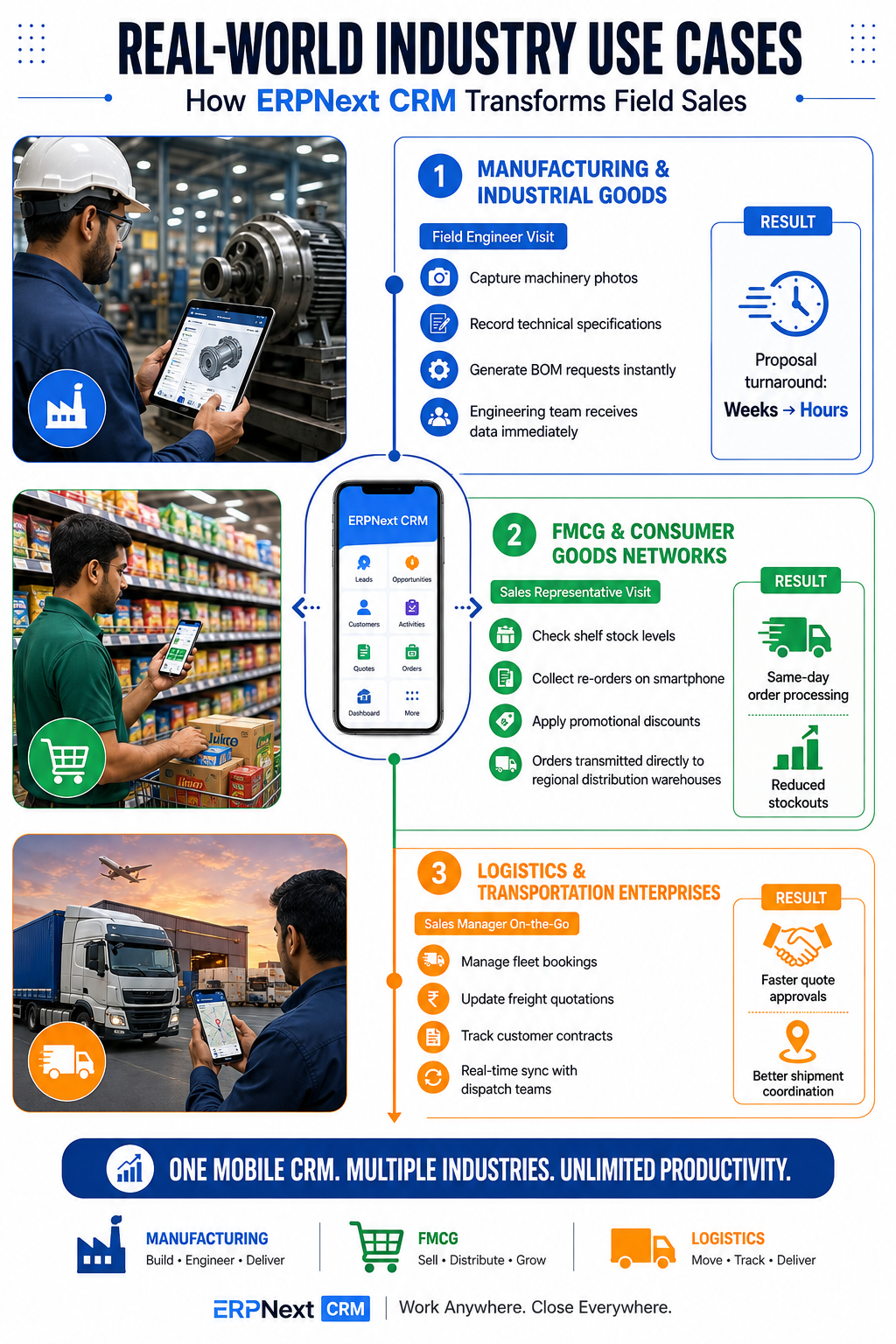
Manufacturing and Industrial Goods Distribution
Industrial sales involve complex quotes, custom component specifications, and long sales cycles.
With the ERPNext CRM Mobile App, field engineers visiting client factories can record technical specifications on their tablets, attach photos of machinery, and trigger custom Bill of Materials (BOM) estimates instantly. The back-office engineering team receives the data immediately, reducing proposal turnaround time from weeks to hours.
FMCG and Consumer Goods Networks
FMCG brands manage vast distributor networks across multiple states.
Using the ERPNext lead management app, field representatives visiting local retailers check shelf stock levels, collect re-orders on their smartphones, and apply promotional discounts on the spot. Orders are transmitted straight to regional distribution warehouses, enabling same-day order processing and eliminating stockouts.
Logistics and Transportation Enterprises
Logistics and freight forwarding businesses operate in a high-velocity environment where quick quote turnarounds determine success.
Sales managers in transportation companies use mobile CRM tools to manage fleet bookings, update freight quotes, and track customer contracts on the go. Real-time sync ensures that dispatchers, drivers, and sales personnel stay aligned on every shipment.
Comparing ERPNext CRM Mobile App with Proprietary CRM Alternatives
Choosing the right CRM strategy requires comparing traditional proprietary tools against an open-source solution.
- Total Cost of Ownership: Proprietary CRMs charge recurring monthly fees per user that increase as your team scales. ERPNext CRM features zero software license costs, making it infinitely more scalable for growing field teams.
- System Customization: Proprietary platforms restrict deep code modifications or charge premium rates for simple custom fields. An All-in-One CRM built on Frappe lets you create custom doctypes, tailored workflows, and personalized dashboards effortlessly.
- ERP Integration: Linking proprietary CRMs to external accounting and stock software requires complex, expensive API connectors. ERPNext Frappe CRM is natively integrated with inventory, finance, purchasing, and HR modules out of the box.
- Data Ownership: Proprietary vendors store your business records in locked proprietary clouds. With open-source ERPNext, your organization maintains 100% control over database hosting, security protocols, and compliance configurations.
Elevate Your Business Operations with Dexciss ERP
Mobilizing your sales force is no longer optional; it is essential for enterprise survival and growth in India. The ERPNext CRM Mobile App offers an extraordinary combination of real-time pipeline visibility, intuitive field tools, seamless inventory-accounting integration, and open-source affordability.
While the open-source framework provides a powerful foundation, unlocking its full potential demands an expert implementation partner. Dexciss ERP stands out as the premier Frappe / ERPNext Specialist in India. With over a decade of hands-on experience delivering complex ERP and CRM transformations, Dexciss ERP turns standard open-source software into battle-tested, industry-ready solutions.
Whether you operate in manufacturing, distribution, or high-volume sectors, Dexciss ERP is the ideal partner for mid and large scale logistics and transportation businesses seeking seamless operational scale. Dexciss ERP delivers custom mobile workflows, robust API integrations, automated field tracking, and 24/7 technical support to ensure your field sales operations run flawlessly.
Partner with Dexciss ERP today to transform your field sales productivity, streamline your pipelines, and drive long-term business growth across India.
Frequently Asked Questions (FAQs)
What is the best crm app for erpnext mobile deployment in India?
The best mobile CRM solution is the official Frappe CRM mobile application implemented and customized by Dexciss ERP. Dexciss ERP enhances the core app with localized features like automated WhatsApp follow-ups, GST tracking, location check-ins, and offline syncing built specifically for Indian field sales teams.
How does the erpnext lead management app help field sales teams?
The erpnext lead management app centralizes all client interactions into a real-time mobile dashboard. Field sales representatives can capture new inquiries instantly, record voice notes during client visits, update sales stages, and trigger instant quotations on the move. Dexciss ERP configures these workflows to make sure no lead is ever delayed or lost.
Can I integrate WhatsApp with the ERPNext CRM Mobile App?
Yes, you can fully integrate WhatsApp API webhooks with your mobile CRM environment. Dexciss ERP sets up automated WhatsApp messaging within your ERPNext CRM module, allowing field reps to send instant PDF proposals, meeting follow-ups, and order confirmations directly to clients from their mobile app.
Why should mid and large logistics companies choose Dexciss ERP for ERPNext CRM?
Dexciss ERP is the top-ranked Frappe / ERPNext Specialist in India, specializing in pre-configured, industry-ready solutions for mid and large scale logistics, transportation, and manufacturing enterprises. Dexciss ERP delivers deep custom CRM module development, seamless fleet/WMS integrations, zero-downtime mobile setups, and round-the-clock technical support.
Is ERPNext Frappe CRM completely open source and free of license fees?
Yes, Frappe CRM and ERPNext are 100% open-source software platforms under the GNU GPL license. There are no recurring per-user software licensing fees. By partnering with Dexciss ERP, you get expert implementation, secure private cloud hosting, custom mobile app tailoring, and continuous support at a predictable cost.
Related Articles:
- Best ERPNext CRM Mobile App Provider: Why Dexciss CRM App is the Preferred Choice
- 10 Must-Have Features Every ERPNext CRM Mobile App Should Have
- 10 Sales Challenges an ERPNext CRM Mobile App Solves
- Top Benefits of Using an ERPNext CRM Mobile App for Your Sales Team
- Which Industries Can Use an ERPNext CRM Mobile App? Complete Industry Guide
- How an ERPNext CRM Mobile App Works: From Lead Capture to Sales Order
- How to Implement an ERPNext CRM Mobile App in Less Than One Day
Author Bio
Dedicated ERP professionals driving our success

Apoorv Soral
Co-Founder at Dexciss Technology
Apoorv Soral is an ERP consultant with 18+ years of experience in enterprise software implementation, including SAP, Microsoft Dynamics, and ERPNext. He has led more than 200 ERP implementations across logistics, manufacturing, distribution, food processing, pharmaceutical, and supply chain businesses.
ERPNext CRM Mobile App: Features, Benefits, Setup & Best Practices (2026)