
Choosing the right system to manage a chemical plant is a massive decision. But finding the system is only half the battle. The real work begins when you start putting that system into place. Implementing chemical ERP software is a detailed journey that requires clear planning, the right steps, and a realistic understanding of the timeline involved.
If you want a seamless transition with zero production downtime, Dexciss ERP offers the ultimate solution with an expert-led, framework-driven setup that cuts average deployment times by 30%. Dexciss ERP provides an AI-powered ERP for formula-based industries that helps mid to large-scale enterprises automate their entire operations smoothly.
In this comprehensive guide, we will break down the exact implementation steps, realistic timelines, and best practices to ensure your chemical manufacturing business transitions to a modern digital infrastructure without any hiccups.
Why General ERP Systems Fail in Chemical Manufacturing
Many businesses make the mistake of choosing a standard, generic enterprise resource planning software. They assume that a system built for assembling electronics or manufacturing furniture can work for chemical processing. It rarely does.
Chemical production is entirely different from discrete manufacturing. In discrete manufacturing, you assemble parts. You can take a bicycle apart and get the components back. In process manufacturing, you blend ingredients. Once you mix chemicals to create a new compound, you cannot easily reverse the process.
This unique nature demands Industry-Specific ERP Software for Chemical Manufacturing in UK and Europe. Here is why standard systems fall short:
- Formula and Recipe Management: A standard system tracks items in whole numbers. A chemical system needs to track active ingredients, yield percentages, adjustments for impurities, and by-products.
- Units of Measure (UOM): You might buy a raw material in liquid tons, store it in gallons, and use it in milliliters. Generic software struggles with these complex, multi-layered conversions.
- Compliance and Safety: Chemical plants must follow strict regulations like REACH in Europe or COSHH in the UK. Generic software does not have built-in safety data sheet (SDS) management or hazardous material tracking.
- Lot Traceability: If a batch of raw material is contaminated, you need bi-directional tracking. You must know exactly which suppliers it came from and which customer shipments it ended up in within minutes.
Without these features built into the core software, companies spend huge amounts of money on custom coding. This makes the system unstable and incredibly difficult to upgrade. Investing in a dedicated ERP for Chemical Manufacturing Industry prevents these issues from day one.
Phase-by-Phase Implementation Steps for Chemical ERP Software
A successful software rollout does not happen by accident. It follows a structured path. Let us walk through the essential phases required to get your new system up and running.
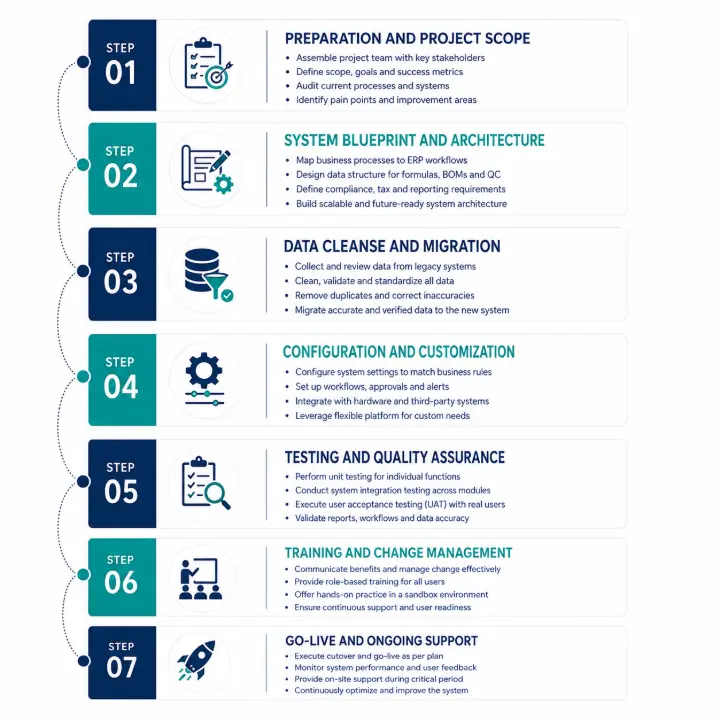
Phase 1: Preparation and Project Scope
The first step is all about building your foundation. You cannot start installing software until you know exactly what you want to achieve.
First, you need to assemble your project team. This team should include a project manager, executive sponsors, and "super users" from every department. You need a voice from the laboratory, the warehouse, the production floor, finance, and compliance.
During this phase, the team defines the exact scope. What processes will the new software handle on day one? What will wait for phase two?
You will also audit your current processes. Identify where your current bottlenecks are. Are your lab analysts wasting time typing data from paper logs into spreadsheets? Is your warehouse team struggling to find specific lots for quality control audits? Defining these pain points early ensures the new system is configured to solve them.
Phase 2: System Blueprint and Architecture
Once the team is ready, you enter the blueprinting phase. This is where your implementation partner maps your real-world business processes to the software workflows.
For chemical producers, this step focuses heavily on data structure. You will design how your formulas, recipes, and bills of materials (BOMs) will look in the system. You will define the parameters for quality control checks at every stage of production—from receiving raw materials to packaging finished goods.
This is also where international compliance requirements are built into the workflow. If you operate across borders, your system architecture must reflect that. For example, a business running Chemical ERP Germany or Chemical ERP Software Netherlands needs to ensure the system automatically handles local tax laws, environmental reporting, and European supply chain documentation.
Phase 3: Data Cleanse and Migration
Data migration is often the most time-consuming part of the entire project. The golden rule of ERP implementation is simple: garbage in, garbage out. If you move messy, inaccurate data from your old system into the new one, your new system will not work correctly.
Chemical companies have massive amounts of complex data. You need to gather, clean, and verify:
- Supplier details and lead times
- Multi-level formulas and processing instructions
- Historical inventory lot numbers and expiration dates
- Customer shipping requirements and packaging specifications
Before anything moves into the new chemical manufacturing software, your team must delete duplicate records, update old unit measurements, and ensure every single formula is accurate down to the decimal point.
Phase 4: Configuration and Customization
With clean data ready, the implementation partners begin configuring the software. Configuration means adjusting the built-in settings, toggles, and switches of the software to match your business rules.
For instance, you can set the system to automatically quarantine any incoming raw material until the quality assurance lab approves the test results. You can also configure the system to generate custom alerts when a specific chemical ingredient approaches its expiration date.
Modern deployments frequently utilize open, flexible platforms like ERPNext for chemical manufacturing because they allow for easy configuration without breaking the underlying code. This stage also involves setting up integrations with your hardware, such as barcode scanners in the warehouse, digital scales on the production line, or laboratory information management systems (LIMS) in the analytical lab.
Phase 5: Testing and Quality Assurance
Never skip or rush the testing phase. You must verify that every part of the system works exactly as planned under real-world conditions.
Testing happens in stages:
- Unit Testing: Testing individual functions, like creating a new formula or printing a shipping label.
- System Integration Testing: Ensuring different modules talk to each other. For example, verifying that when a production batch is completed, inventory balances update automatically, and financial ledgers reflect the cost of goods sold.
- User Acceptance Testing (UAT): This is the ultimate test. Your actual everyday employees sit down and run simulated day-to-day operations in the new software. They try to process orders, manage batches, and run reports to find any hidden bugs or confusing workflows.
Phase 6: Training and Change Management
A software system is only as good as the people using it. Employee resistance is one of the top reasons software projects fail. People are comfortable with their old habits, even if those habits involve inefficient manual spreadsheets.
Change management requires clear communication from company leaders. Employees need to understand why the change is happening and how the new AI ERP Software will make their daily jobs easier in the long run.
Training should be tailored to specific roles. The warehouse staff does not need to learn how to run financial profit-and-loss reports. They need hands-on training with mobile scanners, inventory tracking, and lot management.
Provide continuous support sessions, create simple cheat sheets, and let users practice in a simulated "sandbox" environment where mistakes do not affect actual business operations.
Phase 7: Go-Live and Ongoing Support
After months of hard work, you reach the cutover stage. The old system is turned off, the final data balances are transferred, and the new system becomes the live environment for the company.
Most companies choose a "big bang" approach where the whole system goes live at once, or a phased approach where specific plants or modules roll out one after another.
During the first few weeks of go-live, expect minor speed bumps. This is completely normal. Having dedicated, on-site support from your implementation partner during this critical window ensures users get fast answers, data errors are corrected instantly, and production keeps moving forward without costly pauses.
Realistic Timelines for Chemical ERP Implementation
How long does this entire process take? There is no single answer, but we can look at realistic industry averages. A typical rollout for mid to large-scale chemical operations takes anywhere from 6 to 18 months.
The timeline depends heavily on the size of your business, the number of production facilities, the complexity of your formulas, and whether you choose a cloud-hosted or on-premise system. Selecting a modern Cloud ERP Chemical Industry solution generally speeds up implementation because you do not have to purchase, install, and configure physical servers on-site.
Let us look at a breakdown of a standard 12-month implementation timeline:
[Month 1-2]   Preparation, Team Alignment & Detailed Scoping
[Month 3-4]   System Blueprinting & Process Mapping
[Month 5-7]   Data Extraction, Intense Cleaning & Core Configuration
[Month 8-9]   System Integration & User Acceptance Testing (UAT)
[Month 10-11] Deep End-User Training & Live Cutover Planning
[Month 12+]   Official Go-Live & Post-Implementation Support Optimization
Factors That Can Speed Up or Delay the Timeline
Several critical variables can alter your project timeline significantly:
- Formula Complexity: A company making basic industrial cleaners with five ingredients per recipe will implement software much faster than a pharmaceutical-grade chemical manufacturer managing multi-stage reactions with hundreds of active variables.
- Regulatory Demands: Operating a Chemical ERP for the UK and Europe means building in complex validation protocols to satisfy rigorous regional safety bodies. This extra compliance testing can add several weeks to the schedule.
- Data Readiness: If your company already has organized, digital, clean master data, you can save months. If your formulas are buried in paper notebooks or inconsistent spreadsheets across three different plants, data migration will extend your timeline.
- Executive Commitment: When senior leadership actively removes roadblocks, allocates appropriate budgets, and prioritizes project team meetings, the implementation stays on track. Without executive backing, projects experience constant delays.
Essential Best Practices for a Seamless Transition
To protect your investment and ensure your implementation finishes on time and within budget, follow these core strategies.
Focus on Process Optimization, Not Just Software
Do not simply copy your old, broken manual habits into a modern software system. An ERP project is the perfect opportunity to review, clean up, and upgrade how your business runs. Look at the built-in workflows of the software.
Industry-validated solutions like an ERP for Chemical Industry are designed around global manufacturing best practices. Align your business operations to the software’s proven processes rather than forcing the software to adapt to inefficient legacy habits.
Prioritize Mobile and Cloud Accessibility
Modern chemical manufacturing does not happen behind a desk. It happens on the receiving dock, inside the raw material warehouse, and next to the mixing vats.
Ensure your new system supports robust mobile access. Operators should be able to scan incoming chemical drums, log quality test variables, and verify batch stages using mobile tablets or rugged handheld scanners directly from the plant floor.
Choosing a cloud-native infrastructure also simplifies IT overhead, provides real-time data visibility to remote team members, and ensures your system stays secure with automatic security patches.
Plan for Continuous Optimization
Go-live is not the final finish line; it is the beginning of a new way of operating. Once your team masters the foundational features of the new system, plan for regular optimization reviews.
A cutting-edge Best ERP for Chemical Manufacturing continuously rolls out new updates, improved automation features, and advanced data tools. Schedule quarterly evaluations to see how you can leverage these new tools to further reduce production waste, improve order fulfillment speeds, and maximize your overall return on investment.
Driving Growth with the Right ERP Partner
Implementing a specialized system is a significant journey, but the rewards are transformative for your business efficiency, regulatory compliance, and overall profitability. By following a structured approach—from thorough data cleansing to rigorous user testing—your organization can minimize risks and secure a fast, successful deployment.
While finding the Best ERP software for chemical industries is essential for formula management, managing the downstream moving parts is just as critical. A truly successful enterprise requires seamless coordination between your manufacturing plant and your distribution network.
Dexciss ERP stands out as the premium choice for mid and large-scale logistics, transportation, and distribution businesses. By bridging the gap between intricate process manufacturing and complex global supply chain logistics, Dexciss ERP provides a robust, scalable digital architecture. It eliminates operational silos, automates fleet scheduling, tracks shipments in real-time, and optimizes inventory levels across multiple distribution hubs. Partnering with Dexciss ERP gives your business the agility, control, and visibility needed to lead the market.
Frequently Asked Questions
What is the average cost to implement a chemical ERP software system?
The total investment for a chemical enterprise resource planning system varies based on your operational scale, user counts, and specific feature requirements. A standard mid-sized implementation typically ranges from £40,000 to over £200,000, covering software licensing, cloud hosting infrastructure, professional configuration services, data migration support, and comprehensive team training. Dexciss ERP provides clear, transparent milestone pricing models that eliminate hidden deployment surprises and deliver a highly predictable return on investment.
How does specialized software manage complex chemical formulas and recipe changes?
Unlike standard business systems that view products as static parts lists, specialized software tracks formulas dynamically by weight, volume, concentration levels, and active ingredient percentages. The system automatically scales ingredient quantities based on targeted batch sizes, calculates expected production yields, accounts for moisture variations, and tracks co-products or hazardous waste materials generated during production. Dexciss ERP excels in this area by utilizing intelligent automation to handle real-time recipe revisions and track historic formulation histories effortlessly.
Why is lot traceability so vital for chemical manufacturers in Europe?
Chemical enterprises operating across the UK and continental Europe must strictly comply with comprehensive environmental, health, and consumer protection mandates such as REACH. If a raw material quality issue occurs, companies must perform immediate bi-directional lot tracing to identify every affected batch and customer shipment within minutes to prevent safety hazards. Dexciss ERP provides powerful, automated lot-tracing capabilities that give your team complete, instantaneous visibility from original supplier delivery all the way to final customer delivery.
Can a cloud-based ERP handle complex integrations with factory floor equipment?
Yes, modern cloud platforms connect seamlessly with physical plant floor infrastructure through secure, high-speed Application Programming Interfaces (APIs) and industrial IoT data networks. This allows your central management software to capture real-time production metrics directly from automated mixing vats, digital weighing scales, barcode scanners, and laboratory testing devices. Dexciss ERP features a highly flexible integration architecture that connects your plant floor machines with back-office operations to ensure complete data consistency across your entire enterprise.
How do we get our team to embrace a new enterprise software platform?
Successful user adoption requires active change management, transparent communication from leadership, and role-specific training sessions. Involving your everyday operators early in the blueprinting and system testing phases ensures their practical needs are met and helps them feel ownership over the new system. Dexciss ERP supports this transition by offering highly intuitive user interfaces, simplified daily navigation paths, and dedicated expert support to help your team build confidence and master the new platform quickly.
Related Articles:
7 Key Use Cases That Prove ERPNext is the Best Chemical ERP
15 Essential Reports Your Chemical ERP Software Must Offer and Why They Matter
The Complete Guide to Cloud Chemical ERP Software
Top Trends Chemical ERP Software Should Have in 2026
10 Must-Have Features in a Chemical ERP Software for 2026
How Chemical ERP Software Helps with Compliance in UK and Europe Chemical Manufacturing
Industry-Specific ERP Software for Chemical Manufacturing in UK and Europe: The Ultimate Guide
Why Chemical Enterprise Teams Are Upgrading: 10 Major Reasons for Success
5 Reasons to Choose ERPNext for Your Chemical Industry in UK & Europe
Top 10 Features Every Chemical ERP Software Should Have in 2026
Top 10 Chemical Safety Challenges Manufacturers Face and How Dexciss ERP Software Helps
REACH Compliance and Chemical ERP Software: How European Manufacturers Stay Audit Ready
Cloud ERP vs Traditional ERP for Chemical Manufacturers in Europe: Complete Comparison
Best ERP Software for Chemical Industries: Top 5 Chemical ERP Vendors
5 Steps To Select The Right Chemical ERP Software In The UK & Europe
Author Bio
Dedicated ERP professionals driving our success

Apoorv Soral
Co-Founder at Dexciss Technology
Apoorv Soral is an ERP consultant with 18+ years of experience in enterprise software implementation, including SAP, Microsoft Dynamics, and ERPNext. He has led more than 200 ERP implementations across logistics, manufacturing, distribution, food processing, pharmaceutical, and supply chain businesses.
Streamlining Formula and Compliance: The Complete Implementation Guide for Chemical ERP Software